The Insight User Guide Explained: Find What You Need
Emotiv
Updated on
Apr 24, 2026
The Insight User Guide Explained: Find What You Need
Emotiv
Updated on
Apr 24, 2026
The Insight User Guide Explained: Find What You Need
Emotiv
Updated on
Apr 24, 2026
Whether you're a researcher designing a study, a developer building an application, or an enthusiast exploring cognitive patterns, your goals are unique. A one-size-fits-all instruction manual just doesn’t cut it. A truly effective user guide recognizes this diversity and provides clear, tailored pathways for different users. It should feel like a knowledgeable partner, anticipating your questions and guiding you toward your specific objectives. We designed our 'insight user guide' with this in mind. In this post, we’ll explore how to find the right information for your project, ensuring you can get from setup to discovery as smoothly as possible.
Key Takeaways
Start Strong with a Solid User Guide: A clear guide helps you get set up correctly from the start, saving you time and preventing common frustrations so you can focus on your project.
Master Your Tools from Setup to Integration: A quality user guide should walk you through everything from initial setup and software features to troubleshooting and connecting with other applications, giving you a complete roadmap.
Go from Learning to Mastery with Community Support: Supplement the official guide by experimenting with your device, exploring video tutorials, and connecting with other users in community forums to find new solutions and inspiration.
What is an Insight User Guide?
When you get a new piece of technology, a good user guide can be the difference between a smooth start and a frustrating one. But the term "Insight Guide" can mean a couple of different things, so let's break down what it is and why it matters for your work. Whether you're using a specific device or a broader data analysis tool, having a clear guide is key to making progress without getting bogged down in technical details. It’s your roadmap to using a tool confidently and effectively from day one.
What It Is and Why You Need It
At its core, a user guide is a resource designed to help you get the most out of a product or platform. Think of it as your instruction manual, but better. It walks you through everything from initial setup and installation to explaining every feature in detail. A great guide also includes troubleshooting tips and best practices, so you can solve problems quickly and use the tool effectively. You need it because it saves you time and helps you avoid common pitfalls, ensuring you can focus on your research or project instead of getting stuck on technicalities.
Understanding Different Insight Guides
The term "Insight Guide" can be a bit tricky because it's used in a couple of ways. First, it can refer to the user manual for a specific product, like our Insight headset. This type of guide is focused on helping you operate that particular piece of hardware or software. However, "insight" also describes a broader category of tools that help you understand complex data. For example, audience insights platforms analyze information from different sources to reveal customer behaviors and preferences. These tools are all about gathering and interpreting data to find meaningful patterns, which is a key part of fields like neuromarketing.
What to Look for in an Insight User Guide
When you get a new piece of technology, the user guide can be your best friend or your biggest headache. A great guide is more than just a list of features; it’s a roadmap that helps you get from unboxing to achieving your goals smoothly. It should feel like having an expert right there with you, anticipating your questions and showing you the ropes. Whether you're setting up an EEG headset for the first time or trying to integrate data into a custom application, the quality of the documentation makes all the difference.
A truly helpful user guide is organized, clear, and comprehensive. It doesn’t assume you know everything, but it also doesn’t talk down to you. It should cover four essential areas to make your experience successful: the initial setup, a tour of the interface, a place to find answers when you get stuck, and instructions for connecting the tool with your other systems. Before you commit to a product, it’s always a good idea to check out its user guide. A well-written guide often reflects a well-designed product and a company that cares about its users' success.
Getting Started: Setup and Installation
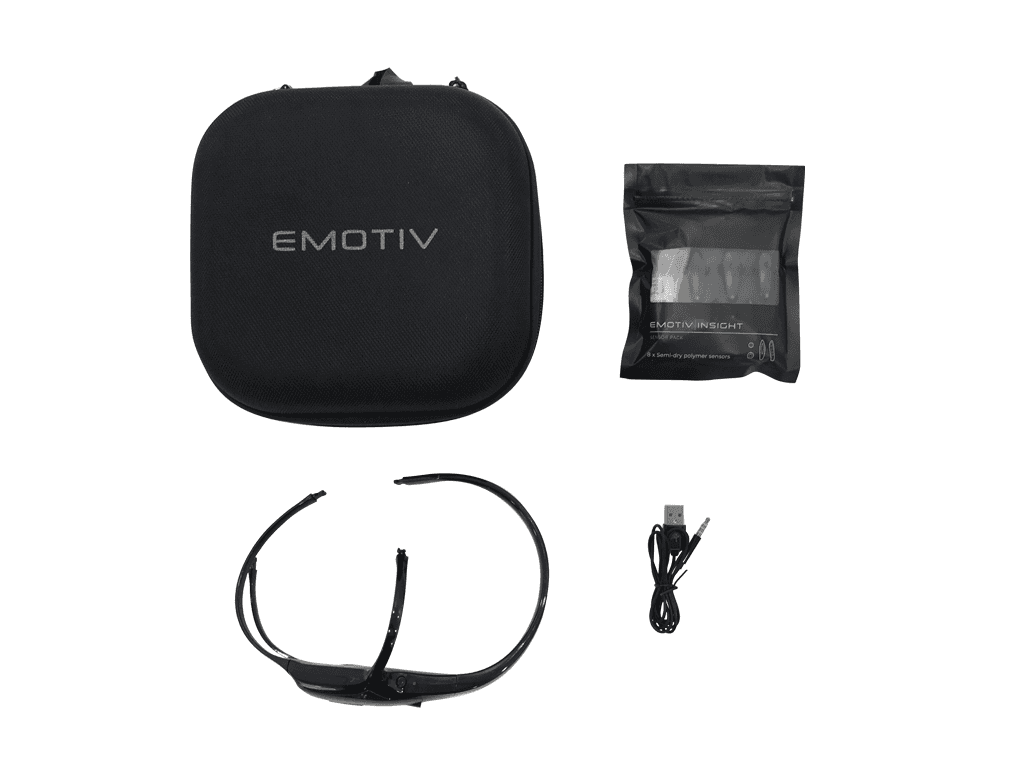
The first few moments with a new device are critical. A good user guide makes the setup and installation process feel effortless. It should provide clear, step-by-step instructions that walk you through everything from assembling the hardware to installing the necessary software. Look for guides with helpful visuals, like diagrams or screenshots, to make sure you’re on the right track. The goal is to get you up and running quickly, so you can start exploring what your new Insight headset can do without any initial frustration. A confusing setup process can stop you before you even begin, so a guide that simplifies these first steps is invaluable.
Navigating the Interface and Features
Once your device is set up, you need to understand the software you'll be using. A solid user guide will act as your personal tour guide, explaining the layout of the interface and the purpose of each feature. It should clearly define key terms and show you how to access different functions. This helps you build confidence and allows you to use the tool to its full potential. For example, our EmotivPRO software is designed for in-depth analysis, and its guide is structured to help you understand everything from recording data to performing advanced analysis, ensuring you can find and use the features you need for your research.
Finding Answers: Troubleshooting and FAQs
Even with the best technology, you might run into a snag. That’s where a thorough troubleshooting section comes in. A great user guide anticipates common issues and provides straightforward solutions. Look for a dedicated FAQ (Frequently Asked Questions) section that addresses typical user challenges. This empowers you to solve minor problems on your own without having to wait for a support response. Having these resources readily available saves you time and keeps your projects moving forward. It shows that the company has listened to its users and created a resource to help them succeed.
Connecting Your Tools: Integration and Compatibility
In today's interconnected world, it's rare for a tool to work in isolation. A user guide should provide clear instructions on how to integrate the product with other software and systems. For developers and researchers, this is especially important. The guide should detail API access, list compatible software, and offer code examples to make the integration process as smooth as possible. This information is key to building custom applications or incorporating brain data into a larger project. Our EmotivBCI software, for instance, allows you to create commands from mental states, and the guide is essential for connecting it to your applications.
The Benefits of a Great User Guide
A great user guide is more than just a set of instructions; it’s your roadmap to success. When you’re working with sophisticated technology like EEG headsets, having a clear, comprehensive guide can make all the difference. It transforms a potentially complex process into a straightforward experience. Instead of spending hours on trial and error, you can get right to what matters: collecting clean data, running your experiments, or exploring your own cognitive patterns. A well-written guide empowers you to learn quickly, work efficiently, and handle your data with confidence. It’s designed to anticipate your questions and provide clear answers, helping you get the most value out of your tools from the very first day.
Learn Faster and Understand More
A well-structured user guide is your personal tutor, helping you get up to speed quickly. It breaks down complex concepts into simple, actionable steps so you can grasp the essentials without feeling overwhelmed. By providing clear insights into how the technology works, a guide helps you make more informed choices about your projects. This is especially crucial in fields like academic research and education, where understanding the nuances of data collection directly impacts the quality of your results. A good guide doesn’t just tell you what to do; it explains the why behind each step, giving you the confidence to move forward with your work.
Work Smarter, Not Harder
Your time is valuable, and a solid user guide respects that by streamlining your entire workflow. From initial setup to advanced analysis, it removes the guesswork and helps you avoid common pitfalls. Think of it as a way to remove bottlenecks and put the power of analysis directly in your hands, regardless of your technical background. Instead of searching forums for answers, you have a reliable resource at your fingertips. This allows you to focus your energy on innovation and discovery rather than troubleshooting. With a clear guide, you can leverage powerful software like EmotivPRO to its full potential and make data-driven decisions with greater speed and accuracy.
Keep Your Data Secure
When you're working with brain data, security isn't just a feature; it's a necessity. A great user guide will always address how to handle your data responsibly. It’s important that data is stored and managed in a secure way, allowing you to make decisions while ensuring that information can be safely accessed in the future. Our guides provide clear protocols on data management, storage, and privacy to help you maintain ethical standards in your work. This builds trust and ensures that the sensitive information you collect is protected. For any developer building applications with our tools, understanding these security practices is a critical first step.
Solve Common Problems with an Insight Guide
A great user guide is more than a simple instruction manual; it’s your first line of support for troubleshooting common issues. Let’s face it, even the most user-friendly technology can present challenges, whether you’re setting it up for the first time or trying to integrate it into a complex project. A well-written guide anticipates these hurdles and provides clear, actionable solutions so you can get back to your work quickly. From initial configuration to advanced workflow automation, the right documentation can turn a frustrating roadblock into a minor speed bump. It’s the resource that helps you solve problems on your own time, empowering you to become an expert with your tools.
Fixing Setup and Configuration Issues
Getting started on the right foot is essential. The initial setup and configuration can feel overwhelming, but a good guide provides a clear path forward. Many professionals need a platform that is intuitive and quick to use, and the guide is key to that experience. It should offer step-by-step instructions for everything from unboxing your Insight headset to ensuring each sensor has proper contact. This process is critical for collecting clean, reliable data. A detailed guide will walk you through connecting to our Emotiv App, confirming your device’s connection, and understanding the initial readings, giving you the confidence that your equipment is ready for your project.
Mastering Features and Functions
Once you’re set up, the next step is exploring what your Insight headset and our software can do. A user guide acts as a detailed map of all available features, from basic recording to advanced data analysis. It helps you understand different performance metrics, manage project settings, and interpret the data you’re collecting. For teams, guides often explain how to manage access for different researchers, which is a huge benefit for data security and research consistency. By explaining the practical applications of each function, the guide helps you move beyond basic use and fully apply the power of a tool like EmotivPRO to your work.
Solving Integration and Compatibility Headaches
Your Insight headset is often one piece of a larger toolkit. Researchers and developers usually have preferred analysis programs and existing workflows, so compatibility is key. This is where a user guide becomes invaluable, saving you hours of trial-and-error. It should clearly outline how to export data in various formats and how to connect with other applications through our software development kits. For anyone looking to build custom applications or pipe brain data into other software, the guide is the primary resource for understanding integration protocols. It provides the technical details you need to make our hardware work seamlessly with your other tools, which you can explore on our page for developers.
Streamlining Your Workflow
Beyond just using the features, a great user guide helps you use them efficiently. It can reveal shortcuts, best practices, and automation opportunities that streamline your entire process from data collection to analysis. By learning how to create repeatable experimental protocols or batch-process your data, you can enhance your productivity and ensure consistency across your projects. The goal is to embed your tools directly into your existing operations, making them a natural part of how you work. This allows you to spend less time managing the technology and more time focusing on your academic research or development goals.
Where to Find the Best Insight User Guides
Getting started with a new piece of technology can feel like a big step, but you don’t have to figure it out alone. The right user guide can make all the difference, turning initial questions into confident action. Whether you’re setting up your Insight headset for the first time or looking for advanced ways to use our software, there are several places you can turn to for reliable information. Knowing where to look is the first step toward getting the most from your device. From official manuals created by our team to community hubs full of shared knowledge, the answers you need are within reach. Let’s walk through the best resources available to help you on your journey.
Official Product Documentation
Your first and most reliable stop for information should always be the official product documentation. This is the content we create and vet ourselves, so you can trust it’s accurate, comprehensive, and up-to-date with the latest software versions. Here, you’ll find everything from quick-start guides for setting up your Insight headset to detailed technical specifications and walkthroughs for our software platforms. We’ve designed our Emotiv support hub to be your primary resource for any questions that come up. Think of it as your foundational library, perfect for building a solid understanding of how your headset and its software work together, ensuring you start on the right foot.
Community Forums and User Groups
Sometimes the best insights come from people who are using the technology in the same way you are. Community forums and user groups are fantastic places to find practical advice, troubleshoot specific issues, and discover new ways to use your Insight headset. These platforms allow you to connect with a global network of researchers, developers, and enthusiasts who are happy to share their experiences and solutions. Our Emotiv community channels, including GitHub and Discord, are active hubs for discussion. It’s a great space to ask a question you can’t find the answer to in the official docs or to share your own projects with others.
Checking for Updates and Compatibility
Technology is always evolving, and we’re constantly working to refine our software and firmware to give you the best experience possible. Regularly checking for updates is key to ensuring your Insight headset and software perform optimally. New releases often include valuable feature enhancements, performance improvements, and important security updates. You can find information on the latest software versions and check for compatibility with your operating system on our developer pages. Staying current ensures all your tools work together seamlessly, so you can focus on your work without worrying about technical hiccups or outdated features.
A Guide for Every User
Different people come to Emotiv with different goals, and a great user guide should speak to all of them. Whether you're conducting a formal study, building a new application, or exploring your own cognitive patterns, the right documentation makes all the difference. A user guide isn't just a manual; it's a roadmap that helps you get from setup to discovery as smoothly as possible. It ensures you can apply the right methods, use the correct tools, and make sense of your results. Let's look at how our guides are tailored to help you succeed, no matter what your project is.
For Researchers and Educators
When you're deep in a study, you need a platform that’s intuitive and lets you focus on the work, not the tool. Our guides are designed to help you streamline your entire process, from participant setup to data analysis. We show you how to get the most out of our software, like EmotivPRO, so you can confidently make strategic decisions based on your findings. Understanding your audience and its various segments is key, and our documentation provides clear steps for setting up experiments and interpreting data. This allows you to spend less time on technical hurdles and more time gaining valuable insights for your academic research and education projects.
For Developers
As a developer, you want to integrate new capabilities into your existing applications without a steep learning curve. Our user guides are built to support you in embedding our technology directly into your workflows. We provide clear documentation for our APIs and software development kits, showing you how to work with our data streams securely and efficiently. Whether you're building a brain-computer interface or a custom analytics tool, our guides offer the technical details you need. This helps you connect our hardware and software to the programs you already use, making it easier to create powerful, data-driven experiences for your users.
For Neuromarketers and Wellness Enthusiasts
Whether you're exploring customer behavior or your own cognitive patterns, you need a clear path to understanding the data. For neuromarketers, our guides explain how to gather audience insights that go beyond basic demographics, helping you understand customer interests and preferences. For those on a personal journey, we show you how to use our tools to access cognitive wellness data. Our documentation helps you get a more unified and intelligent view of your data, empowering you to make more informed decisions in your marketing campaigns or personal wellness practices.
What Makes Our Insight Guide Stand Out?
A good user guide does more than just list features; it empowers you to get the most out of your tools. We designed our Insight user guide to be a practical partner in your journey with EEG technology. It’s built to be clear, comprehensive, and focused on helping you achieve your goals, whether you're conducting formal research, developing a new application, or exploring your own cognitive processes. We focus on providing actionable steps that make complex processes feel simple and intuitive.
Setting Up and Calibrating Your Headset
Getting started with new hardware can sometimes feel daunting, but we’ve made it a priority to ensure your initial experience is smooth and successful. Our guide provides clear, step-by-step instructions for fitting your Insight headset correctly and achieving optimal sensor contact. We walk you through the calibration process in a way that’s easy to follow, so you can be confident you’re getting clean, reliable data from the very beginning. Think of it as your personal setup assistant, designed to get you from unboxing to discovery without the guesswork.
Integrating Software and Collecting Data
Your headset is just one piece of the puzzle. Our guide bridges the gap between hardware and software, showing you exactly how to connect your Insight to our powerful data analysis platforms. We provide straightforward instructions for integrating with software like EmotivPRO, allowing you to streamline data collection and analysis. The guide helps you understand the software interface and features, so you can spend less time figuring out the tools and more time focused on your results. It’s all about making the entire workflow, from signal acquisition to data interpretation, feel cohesive and intuitive.
Accessing Cognitive Wellness Tools
Beyond raw data, the Insight headset provides access to a suite of cognitive wellness tools through the Emotiv App. Our user guide explains how to use these features to explore metrics related to focus, stress, and relaxation. We break down what each metric represents and how you can interact with the app to see your brain activity in real time. This part of the guide is designed to make our technology personally meaningful, giving you a clear path to using our tools for self-exploration and personal insight without making any prescriptive claims.
Go Beyond the Guide: Extra Resources
A great user guide is your foundation, but sometimes you need a little extra support to bring your projects to life. Think of these resources as the next step in your learning, helping you move from understanding the basics to mastering the tools. From visual walkthroughs to instant in-app answers, there are plenty of ways to get the help you need, exactly when you need it. Exploring these additional resources can help you solve problems faster and discover new ways to use your Emotiv hardware and software.
These materials are designed to complement the user guide, offering different formats for different learning styles. Whether you prefer watching a video, searching a database, or connecting with other users, there’s something that can help you achieve your goals.
Interactive Tutorials and Videos
Let's be honest, sometimes watching someone do something is much easier than reading about it. Interactive tutorials and videos are perfect for visual learners. They can walk you through everything from unboxing your headset to performing a complex analysis in EmotivPRO. Many professionals need a platform that’s intuitive and quick to use, and video guides help you get up to speed without getting stuck in the details. This is especially helpful for our community in academic research and education who need to onboard new team members efficiently. Visual guides make complex processes feel more approachable and easier to follow.
Knowledge Bases and In-App Help
When you’re deep in a project, the last thing you want to do is stop and search for an answer. That’s where knowledge bases and in-app help come in. These tools give you immediate access to articles, definitions, and troubleshooting tips right within your workflow. Our goal is to provide you with real-time insights and solutions that keep you moving forward. You can find a wealth of information in our developer documentation, which acts as a comprehensive knowledge base for anyone building with our technology. This allows you to find solutions instantly and maintain your focus.
Providing Feedback for Better Guides
Our guides are created for you, so your feedback is incredibly valuable. If you find a section confusing or think something is missing, letting us know helps us improve the experience for the entire community. Creating an effective user guide means learning from the people who use it every day, avoiding common mistakes and improving the user experience for everyone. By sharing your thoughts, you play a direct role in making our resources clearer and more helpful. We're always listening and working to make our documentation better, and your perspective is a key part of that process.
Find the Right Insight Guide for You
Choosing the right user guide is just as important as choosing the right headset. The best guide for you depends entirely on what you want to accomplish. Whether you're conducting a formal study, building an application, or exploring your own cognitive patterns, your documentation should feel like a helpful partner. To find the perfect fit, start by thinking about your project goals and how you plan to use our technology. This will help you identify the resources that will serve you best.
Define Your Needs and User Type
Before you dive into any documentation, take a moment to clarify your goals. Are you an academic researcher who needs to understand every detail of data acquisition for a study? Or are you a developer looking for clear instructions to integrate our tools? Understanding your own needs helps you find the right information quickly. Our guides for academic research and education focus on experimental design and data analysis, while developer guides prioritize software integration. Pinpointing your user type helps you filter out the noise and focus on the content that directly supports your work.
Check the Quality and Detail
A great user guide is clear, comprehensive, and easy to follow. Look for documentation that is well-organized with step-by-step instructions and helpful visuals. The best guides are intuitive, allowing you to get set up and start working without unnecessary friction. The level of detail should match your needs; it should be thorough enough to answer your questions but not overwhelming. For complex software like EmotivPRO, a quality guide makes all the difference in streamlining your data analysis and helping you get the most out of its features.
Look for Available Support and Resources
The user guide is your starting point, but it shouldn't be your only resource. Check for a wider support ecosystem that can help when you have questions, including community forums, knowledge bases, and video tutorials. Having access to a community of other users and experts is incredibly valuable, especially when you're working on a complex project. We believe in providing a full suite of resources, which is why we offer extensive documentation and tools for developers and researchers alike. A strong support network ensures you can always find the answers you need.
Get the Most Out of Your Insight User Guide
Your Insight user guide is your roadmap, but the journey to mastering your device is an active one. To really get the most out of your headset, you need to engage with the material, apply it to your goals, and connect with others. Think of the guide as your foundation. From there, you can build your expertise by following a structured learning process, getting hands-on with the hardware and software, and tapping into the collective knowledge of the community. This approach helps you move from simply knowing the features to truly understanding how to use them for your specific projects.
Follow a Clear Learning Path
The best way to learn is with a solid plan. Your user guide provides a clear learning path, beginning with the fundamentals. Start by mastering the initial setup and calibration process to ensure you're collecting clean data. Once you're comfortable, explore the features of the Emotiv App or EmotivPRO. Professionals need intuitive tools that streamline data analysis, and following the guide’s sequence helps you build skills logically. This step-by-step approach prevents you from feeling overwhelmed and ensures you have a strong grasp of each concept before moving on to more advanced applications.
Practice and Experiment
Reading about a feature is one thing; using it is another. Real learning happens when you practice and experiment with your Insight headset. Set aside time for small experiments, like recording your brain activity during different tasks. If you're a developer, try integrating the data with a simple application. Many insight teams have preferred analysis programs, and hands-on practice helps you see how our data works with your existing tools. This experience is invaluable for understanding the nuances of the data and discovering what’s possible with our brain-computer interface technology.
Connect with the Community
You’re not on this journey alone. A powerful resource is the community of Emotiv users. Connecting with other researchers, developers, and enthusiasts provides fresh perspectives and solutions to common challenges. Online forums and user groups are great places to ask questions and share findings. Understanding how a diverse audience uses a tool can give you the insight to make confident decisions in your own work. By engaging with the community, you can learn new techniques, get feedback, and stay inspired. Our developer resources are a great place to start connecting.
Related Articles
Frequently Asked Questions
What's the most important thing to look for in a user guide for a complex device like an EEG headset? A great guide should make the complex feel simple. Look for clear, step-by-step instructions for the initial setup and calibration, as this is crucial for getting clean data. It should also have a thorough troubleshooting section that anticipates common issues. A well-organized guide that walks you through both the hardware and software shows that a company has really thought about the user's experience from start to finish.
I'm not a developer or a researcher. Is the Insight user guide still for me? Absolutely. While we provide in-depth information for technical users, our guides are designed to be accessible to everyone. If your goal is to explore your own cognitive patterns, the guide clearly explains how to use the Insight headset with our Emotiv App. It walks you through how to access and understand metrics related to focus and relaxation, making it a useful tool for personal discovery.
Does the guide only cover setting up the hardware? The guide covers much more than just the initial setup. While getting a proper fit and connection is the first step, our documentation is a comprehensive resource for the entire process. It provides a full tour of our software platforms, explains how to collect and interpret data, and offers instructions for exporting your data or integrating it with other applications. It’s designed to be your partner from unboxing to analysis.
What if I run into a problem that isn't covered in the user guide? The user guide is your first and best resource, but it isn't the only one. We have a whole ecosystem of support available. Our community forums and Discord channel are great places to connect with other users who may have faced similar challenges. We also maintain a comprehensive knowledge base and developer documentation that you can search for more specific technical answers.
Why should I bother reading the guide if I can just figure it out myself? You certainly can, but the guide is your best shortcut to success. It helps you avoid common pitfalls that can lead to frustration or, more importantly, poor data quality. Reading the guide ensures your setup is correct from the start and helps you discover powerful features in our software that you might have otherwise missed. It’s about working smarter, saving time, and getting the most value out of your headset right away.
Whether you're a researcher designing a study, a developer building an application, or an enthusiast exploring cognitive patterns, your goals are unique. A one-size-fits-all instruction manual just doesn’t cut it. A truly effective user guide recognizes this diversity and provides clear, tailored pathways for different users. It should feel like a knowledgeable partner, anticipating your questions and guiding you toward your specific objectives. We designed our 'insight user guide' with this in mind. In this post, we’ll explore how to find the right information for your project, ensuring you can get from setup to discovery as smoothly as possible.
Key Takeaways
Start Strong with a Solid User Guide: A clear guide helps you get set up correctly from the start, saving you time and preventing common frustrations so you can focus on your project.
Master Your Tools from Setup to Integration: A quality user guide should walk you through everything from initial setup and software features to troubleshooting and connecting with other applications, giving you a complete roadmap.
Go from Learning to Mastery with Community Support: Supplement the official guide by experimenting with your device, exploring video tutorials, and connecting with other users in community forums to find new solutions and inspiration.
What is an Insight User Guide?
When you get a new piece of technology, a good user guide can be the difference between a smooth start and a frustrating one. But the term "Insight Guide" can mean a couple of different things, so let's break down what it is and why it matters for your work. Whether you're using a specific device or a broader data analysis tool, having a clear guide is key to making progress without getting bogged down in technical details. It’s your roadmap to using a tool confidently and effectively from day one.
What It Is and Why You Need It
At its core, a user guide is a resource designed to help you get the most out of a product or platform. Think of it as your instruction manual, but better. It walks you through everything from initial setup and installation to explaining every feature in detail. A great guide also includes troubleshooting tips and best practices, so you can solve problems quickly and use the tool effectively. You need it because it saves you time and helps you avoid common pitfalls, ensuring you can focus on your research or project instead of getting stuck on technicalities.
Understanding Different Insight Guides
The term "Insight Guide" can be a bit tricky because it's used in a couple of ways. First, it can refer to the user manual for a specific product, like our Insight headset. This type of guide is focused on helping you operate that particular piece of hardware or software. However, "insight" also describes a broader category of tools that help you understand complex data. For example, audience insights platforms analyze information from different sources to reveal customer behaviors and preferences. These tools are all about gathering and interpreting data to find meaningful patterns, which is a key part of fields like neuromarketing.
What to Look for in an Insight User Guide
When you get a new piece of technology, the user guide can be your best friend or your biggest headache. A great guide is more than just a list of features; it’s a roadmap that helps you get from unboxing to achieving your goals smoothly. It should feel like having an expert right there with you, anticipating your questions and showing you the ropes. Whether you're setting up an EEG headset for the first time or trying to integrate data into a custom application, the quality of the documentation makes all the difference.
A truly helpful user guide is organized, clear, and comprehensive. It doesn’t assume you know everything, but it also doesn’t talk down to you. It should cover four essential areas to make your experience successful: the initial setup, a tour of the interface, a place to find answers when you get stuck, and instructions for connecting the tool with your other systems. Before you commit to a product, it’s always a good idea to check out its user guide. A well-written guide often reflects a well-designed product and a company that cares about its users' success.
Getting Started: Setup and Installation
The first few moments with a new device are critical. A good user guide makes the setup and installation process feel effortless. It should provide clear, step-by-step instructions that walk you through everything from assembling the hardware to installing the necessary software. Look for guides with helpful visuals, like diagrams or screenshots, to make sure you’re on the right track. The goal is to get you up and running quickly, so you can start exploring what your new Insight headset can do without any initial frustration. A confusing setup process can stop you before you even begin, so a guide that simplifies these first steps is invaluable.
Navigating the Interface and Features
Once your device is set up, you need to understand the software you'll be using. A solid user guide will act as your personal tour guide, explaining the layout of the interface and the purpose of each feature. It should clearly define key terms and show you how to access different functions. This helps you build confidence and allows you to use the tool to its full potential. For example, our EmotivPRO software is designed for in-depth analysis, and its guide is structured to help you understand everything from recording data to performing advanced analysis, ensuring you can find and use the features you need for your research.
Finding Answers: Troubleshooting and FAQs
Even with the best technology, you might run into a snag. That’s where a thorough troubleshooting section comes in. A great user guide anticipates common issues and provides straightforward solutions. Look for a dedicated FAQ (Frequently Asked Questions) section that addresses typical user challenges. This empowers you to solve minor problems on your own without having to wait for a support response. Having these resources readily available saves you time and keeps your projects moving forward. It shows that the company has listened to its users and created a resource to help them succeed.
Connecting Your Tools: Integration and Compatibility
In today's interconnected world, it's rare for a tool to work in isolation. A user guide should provide clear instructions on how to integrate the product with other software and systems. For developers and researchers, this is especially important. The guide should detail API access, list compatible software, and offer code examples to make the integration process as smooth as possible. This information is key to building custom applications or incorporating brain data into a larger project. Our EmotivBCI software, for instance, allows you to create commands from mental states, and the guide is essential for connecting it to your applications.
The Benefits of a Great User Guide
A great user guide is more than just a set of instructions; it’s your roadmap to success. When you’re working with sophisticated technology like EEG headsets, having a clear, comprehensive guide can make all the difference. It transforms a potentially complex process into a straightforward experience. Instead of spending hours on trial and error, you can get right to what matters: collecting clean data, running your experiments, or exploring your own cognitive patterns. A well-written guide empowers you to learn quickly, work efficiently, and handle your data with confidence. It’s designed to anticipate your questions and provide clear answers, helping you get the most value out of your tools from the very first day.
Learn Faster and Understand More
A well-structured user guide is your personal tutor, helping you get up to speed quickly. It breaks down complex concepts into simple, actionable steps so you can grasp the essentials without feeling overwhelmed. By providing clear insights into how the technology works, a guide helps you make more informed choices about your projects. This is especially crucial in fields like academic research and education, where understanding the nuances of data collection directly impacts the quality of your results. A good guide doesn’t just tell you what to do; it explains the why behind each step, giving you the confidence to move forward with your work.
Work Smarter, Not Harder
Your time is valuable, and a solid user guide respects that by streamlining your entire workflow. From initial setup to advanced analysis, it removes the guesswork and helps you avoid common pitfalls. Think of it as a way to remove bottlenecks and put the power of analysis directly in your hands, regardless of your technical background. Instead of searching forums for answers, you have a reliable resource at your fingertips. This allows you to focus your energy on innovation and discovery rather than troubleshooting. With a clear guide, you can leverage powerful software like EmotivPRO to its full potential and make data-driven decisions with greater speed and accuracy.
Keep Your Data Secure
When you're working with brain data, security isn't just a feature; it's a necessity. A great user guide will always address how to handle your data responsibly. It’s important that data is stored and managed in a secure way, allowing you to make decisions while ensuring that information can be safely accessed in the future. Our guides provide clear protocols on data management, storage, and privacy to help you maintain ethical standards in your work. This builds trust and ensures that the sensitive information you collect is protected. For any developer building applications with our tools, understanding these security practices is a critical first step.
Solve Common Problems with an Insight Guide
A great user guide is more than a simple instruction manual; it’s your first line of support for troubleshooting common issues. Let’s face it, even the most user-friendly technology can present challenges, whether you’re setting it up for the first time or trying to integrate it into a complex project. A well-written guide anticipates these hurdles and provides clear, actionable solutions so you can get back to your work quickly. From initial configuration to advanced workflow automation, the right documentation can turn a frustrating roadblock into a minor speed bump. It’s the resource that helps you solve problems on your own time, empowering you to become an expert with your tools.
Fixing Setup and Configuration Issues
Getting started on the right foot is essential. The initial setup and configuration can feel overwhelming, but a good guide provides a clear path forward. Many professionals need a platform that is intuitive and quick to use, and the guide is key to that experience. It should offer step-by-step instructions for everything from unboxing your Insight headset to ensuring each sensor has proper contact. This process is critical for collecting clean, reliable data. A detailed guide will walk you through connecting to our Emotiv App, confirming your device’s connection, and understanding the initial readings, giving you the confidence that your equipment is ready for your project.
Mastering Features and Functions
Once you’re set up, the next step is exploring what your Insight headset and our software can do. A user guide acts as a detailed map of all available features, from basic recording to advanced data analysis. It helps you understand different performance metrics, manage project settings, and interpret the data you’re collecting. For teams, guides often explain how to manage access for different researchers, which is a huge benefit for data security and research consistency. By explaining the practical applications of each function, the guide helps you move beyond basic use and fully apply the power of a tool like EmotivPRO to your work.
Solving Integration and Compatibility Headaches
Your Insight headset is often one piece of a larger toolkit. Researchers and developers usually have preferred analysis programs and existing workflows, so compatibility is key. This is where a user guide becomes invaluable, saving you hours of trial-and-error. It should clearly outline how to export data in various formats and how to connect with other applications through our software development kits. For anyone looking to build custom applications or pipe brain data into other software, the guide is the primary resource for understanding integration protocols. It provides the technical details you need to make our hardware work seamlessly with your other tools, which you can explore on our page for developers.
Streamlining Your Workflow
Beyond just using the features, a great user guide helps you use them efficiently. It can reveal shortcuts, best practices, and automation opportunities that streamline your entire process from data collection to analysis. By learning how to create repeatable experimental protocols or batch-process your data, you can enhance your productivity and ensure consistency across your projects. The goal is to embed your tools directly into your existing operations, making them a natural part of how you work. This allows you to spend less time managing the technology and more time focusing on your academic research or development goals.
Where to Find the Best Insight User Guides
Getting started with a new piece of technology can feel like a big step, but you don’t have to figure it out alone. The right user guide can make all the difference, turning initial questions into confident action. Whether you’re setting up your Insight headset for the first time or looking for advanced ways to use our software, there are several places you can turn to for reliable information. Knowing where to look is the first step toward getting the most from your device. From official manuals created by our team to community hubs full of shared knowledge, the answers you need are within reach. Let’s walk through the best resources available to help you on your journey.
Official Product Documentation
Your first and most reliable stop for information should always be the official product documentation. This is the content we create and vet ourselves, so you can trust it’s accurate, comprehensive, and up-to-date with the latest software versions. Here, you’ll find everything from quick-start guides for setting up your Insight headset to detailed technical specifications and walkthroughs for our software platforms. We’ve designed our Emotiv support hub to be your primary resource for any questions that come up. Think of it as your foundational library, perfect for building a solid understanding of how your headset and its software work together, ensuring you start on the right foot.
Community Forums and User Groups
Sometimes the best insights come from people who are using the technology in the same way you are. Community forums and user groups are fantastic places to find practical advice, troubleshoot specific issues, and discover new ways to use your Insight headset. These platforms allow you to connect with a global network of researchers, developers, and enthusiasts who are happy to share their experiences and solutions. Our Emotiv community channels, including GitHub and Discord, are active hubs for discussion. It’s a great space to ask a question you can’t find the answer to in the official docs or to share your own projects with others.
Checking for Updates and Compatibility
Technology is always evolving, and we’re constantly working to refine our software and firmware to give you the best experience possible. Regularly checking for updates is key to ensuring your Insight headset and software perform optimally. New releases often include valuable feature enhancements, performance improvements, and important security updates. You can find information on the latest software versions and check for compatibility with your operating system on our developer pages. Staying current ensures all your tools work together seamlessly, so you can focus on your work without worrying about technical hiccups or outdated features.
A Guide for Every User
Different people come to Emotiv with different goals, and a great user guide should speak to all of them. Whether you're conducting a formal study, building a new application, or exploring your own cognitive patterns, the right documentation makes all the difference. A user guide isn't just a manual; it's a roadmap that helps you get from setup to discovery as smoothly as possible. It ensures you can apply the right methods, use the correct tools, and make sense of your results. Let's look at how our guides are tailored to help you succeed, no matter what your project is.
For Researchers and Educators
When you're deep in a study, you need a platform that’s intuitive and lets you focus on the work, not the tool. Our guides are designed to help you streamline your entire process, from participant setup to data analysis. We show you how to get the most out of our software, like EmotivPRO, so you can confidently make strategic decisions based on your findings. Understanding your audience and its various segments is key, and our documentation provides clear steps for setting up experiments and interpreting data. This allows you to spend less time on technical hurdles and more time gaining valuable insights for your academic research and education projects.
For Developers
As a developer, you want to integrate new capabilities into your existing applications without a steep learning curve. Our user guides are built to support you in embedding our technology directly into your workflows. We provide clear documentation for our APIs and software development kits, showing you how to work with our data streams securely and efficiently. Whether you're building a brain-computer interface or a custom analytics tool, our guides offer the technical details you need. This helps you connect our hardware and software to the programs you already use, making it easier to create powerful, data-driven experiences for your users.
For Neuromarketers and Wellness Enthusiasts
Whether you're exploring customer behavior or your own cognitive patterns, you need a clear path to understanding the data. For neuromarketers, our guides explain how to gather audience insights that go beyond basic demographics, helping you understand customer interests and preferences. For those on a personal journey, we show you how to use our tools to access cognitive wellness data. Our documentation helps you get a more unified and intelligent view of your data, empowering you to make more informed decisions in your marketing campaigns or personal wellness practices.
What Makes Our Insight Guide Stand Out?
A good user guide does more than just list features; it empowers you to get the most out of your tools. We designed our Insight user guide to be a practical partner in your journey with EEG technology. It’s built to be clear, comprehensive, and focused on helping you achieve your goals, whether you're conducting formal research, developing a new application, or exploring your own cognitive processes. We focus on providing actionable steps that make complex processes feel simple and intuitive.
Setting Up and Calibrating Your Headset
Getting started with new hardware can sometimes feel daunting, but we’ve made it a priority to ensure your initial experience is smooth and successful. Our guide provides clear, step-by-step instructions for fitting your Insight headset correctly and achieving optimal sensor contact. We walk you through the calibration process in a way that’s easy to follow, so you can be confident you’re getting clean, reliable data from the very beginning. Think of it as your personal setup assistant, designed to get you from unboxing to discovery without the guesswork.
Integrating Software and Collecting Data
Your headset is just one piece of the puzzle. Our guide bridges the gap between hardware and software, showing you exactly how to connect your Insight to our powerful data analysis platforms. We provide straightforward instructions for integrating with software like EmotivPRO, allowing you to streamline data collection and analysis. The guide helps you understand the software interface and features, so you can spend less time figuring out the tools and more time focused on your results. It’s all about making the entire workflow, from signal acquisition to data interpretation, feel cohesive and intuitive.
Accessing Cognitive Wellness Tools
Beyond raw data, the Insight headset provides access to a suite of cognitive wellness tools through the Emotiv App. Our user guide explains how to use these features to explore metrics related to focus, stress, and relaxation. We break down what each metric represents and how you can interact with the app to see your brain activity in real time. This part of the guide is designed to make our technology personally meaningful, giving you a clear path to using our tools for self-exploration and personal insight without making any prescriptive claims.
Go Beyond the Guide: Extra Resources
A great user guide is your foundation, but sometimes you need a little extra support to bring your projects to life. Think of these resources as the next step in your learning, helping you move from understanding the basics to mastering the tools. From visual walkthroughs to instant in-app answers, there are plenty of ways to get the help you need, exactly when you need it. Exploring these additional resources can help you solve problems faster and discover new ways to use your Emotiv hardware and software.
These materials are designed to complement the user guide, offering different formats for different learning styles. Whether you prefer watching a video, searching a database, or connecting with other users, there’s something that can help you achieve your goals.
Interactive Tutorials and Videos
Let's be honest, sometimes watching someone do something is much easier than reading about it. Interactive tutorials and videos are perfect for visual learners. They can walk you through everything from unboxing your headset to performing a complex analysis in EmotivPRO. Many professionals need a platform that’s intuitive and quick to use, and video guides help you get up to speed without getting stuck in the details. This is especially helpful for our community in academic research and education who need to onboard new team members efficiently. Visual guides make complex processes feel more approachable and easier to follow.
Knowledge Bases and In-App Help
When you’re deep in a project, the last thing you want to do is stop and search for an answer. That’s where knowledge bases and in-app help come in. These tools give you immediate access to articles, definitions, and troubleshooting tips right within your workflow. Our goal is to provide you with real-time insights and solutions that keep you moving forward. You can find a wealth of information in our developer documentation, which acts as a comprehensive knowledge base for anyone building with our technology. This allows you to find solutions instantly and maintain your focus.
Providing Feedback for Better Guides
Our guides are created for you, so your feedback is incredibly valuable. If you find a section confusing or think something is missing, letting us know helps us improve the experience for the entire community. Creating an effective user guide means learning from the people who use it every day, avoiding common mistakes and improving the user experience for everyone. By sharing your thoughts, you play a direct role in making our resources clearer and more helpful. We're always listening and working to make our documentation better, and your perspective is a key part of that process.
Find the Right Insight Guide for You
Choosing the right user guide is just as important as choosing the right headset. The best guide for you depends entirely on what you want to accomplish. Whether you're conducting a formal study, building an application, or exploring your own cognitive patterns, your documentation should feel like a helpful partner. To find the perfect fit, start by thinking about your project goals and how you plan to use our technology. This will help you identify the resources that will serve you best.
Define Your Needs and User Type
Before you dive into any documentation, take a moment to clarify your goals. Are you an academic researcher who needs to understand every detail of data acquisition for a study? Or are you a developer looking for clear instructions to integrate our tools? Understanding your own needs helps you find the right information quickly. Our guides for academic research and education focus on experimental design and data analysis, while developer guides prioritize software integration. Pinpointing your user type helps you filter out the noise and focus on the content that directly supports your work.
Check the Quality and Detail
A great user guide is clear, comprehensive, and easy to follow. Look for documentation that is well-organized with step-by-step instructions and helpful visuals. The best guides are intuitive, allowing you to get set up and start working without unnecessary friction. The level of detail should match your needs; it should be thorough enough to answer your questions but not overwhelming. For complex software like EmotivPRO, a quality guide makes all the difference in streamlining your data analysis and helping you get the most out of its features.
Look for Available Support and Resources
The user guide is your starting point, but it shouldn't be your only resource. Check for a wider support ecosystem that can help when you have questions, including community forums, knowledge bases, and video tutorials. Having access to a community of other users and experts is incredibly valuable, especially when you're working on a complex project. We believe in providing a full suite of resources, which is why we offer extensive documentation and tools for developers and researchers alike. A strong support network ensures you can always find the answers you need.
Get the Most Out of Your Insight User Guide
Your Insight user guide is your roadmap, but the journey to mastering your device is an active one. To really get the most out of your headset, you need to engage with the material, apply it to your goals, and connect with others. Think of the guide as your foundation. From there, you can build your expertise by following a structured learning process, getting hands-on with the hardware and software, and tapping into the collective knowledge of the community. This approach helps you move from simply knowing the features to truly understanding how to use them for your specific projects.
Follow a Clear Learning Path
The best way to learn is with a solid plan. Your user guide provides a clear learning path, beginning with the fundamentals. Start by mastering the initial setup and calibration process to ensure you're collecting clean data. Once you're comfortable, explore the features of the Emotiv App or EmotivPRO. Professionals need intuitive tools that streamline data analysis, and following the guide’s sequence helps you build skills logically. This step-by-step approach prevents you from feeling overwhelmed and ensures you have a strong grasp of each concept before moving on to more advanced applications.
Practice and Experiment
Reading about a feature is one thing; using it is another. Real learning happens when you practice and experiment with your Insight headset. Set aside time for small experiments, like recording your brain activity during different tasks. If you're a developer, try integrating the data with a simple application. Many insight teams have preferred analysis programs, and hands-on practice helps you see how our data works with your existing tools. This experience is invaluable for understanding the nuances of the data and discovering what’s possible with our brain-computer interface technology.
Connect with the Community
You’re not on this journey alone. A powerful resource is the community of Emotiv users. Connecting with other researchers, developers, and enthusiasts provides fresh perspectives and solutions to common challenges. Online forums and user groups are great places to ask questions and share findings. Understanding how a diverse audience uses a tool can give you the insight to make confident decisions in your own work. By engaging with the community, you can learn new techniques, get feedback, and stay inspired. Our developer resources are a great place to start connecting.
Related Articles
Frequently Asked Questions
What's the most important thing to look for in a user guide for a complex device like an EEG headset? A great guide should make the complex feel simple. Look for clear, step-by-step instructions for the initial setup and calibration, as this is crucial for getting clean data. It should also have a thorough troubleshooting section that anticipates common issues. A well-organized guide that walks you through both the hardware and software shows that a company has really thought about the user's experience from start to finish.
I'm not a developer or a researcher. Is the Insight user guide still for me? Absolutely. While we provide in-depth information for technical users, our guides are designed to be accessible to everyone. If your goal is to explore your own cognitive patterns, the guide clearly explains how to use the Insight headset with our Emotiv App. It walks you through how to access and understand metrics related to focus and relaxation, making it a useful tool for personal discovery.
Does the guide only cover setting up the hardware? The guide covers much more than just the initial setup. While getting a proper fit and connection is the first step, our documentation is a comprehensive resource for the entire process. It provides a full tour of our software platforms, explains how to collect and interpret data, and offers instructions for exporting your data or integrating it with other applications. It’s designed to be your partner from unboxing to analysis.
What if I run into a problem that isn't covered in the user guide? The user guide is your first and best resource, but it isn't the only one. We have a whole ecosystem of support available. Our community forums and Discord channel are great places to connect with other users who may have faced similar challenges. We also maintain a comprehensive knowledge base and developer documentation that you can search for more specific technical answers.
Why should I bother reading the guide if I can just figure it out myself? You certainly can, but the guide is your best shortcut to success. It helps you avoid common pitfalls that can lead to frustration or, more importantly, poor data quality. Reading the guide ensures your setup is correct from the start and helps you discover powerful features in our software that you might have otherwise missed. It’s about working smarter, saving time, and getting the most value out of your headset right away.
Whether you're a researcher designing a study, a developer building an application, or an enthusiast exploring cognitive patterns, your goals are unique. A one-size-fits-all instruction manual just doesn’t cut it. A truly effective user guide recognizes this diversity and provides clear, tailored pathways for different users. It should feel like a knowledgeable partner, anticipating your questions and guiding you toward your specific objectives. We designed our 'insight user guide' with this in mind. In this post, we’ll explore how to find the right information for your project, ensuring you can get from setup to discovery as smoothly as possible.
Key Takeaways
Start Strong with a Solid User Guide: A clear guide helps you get set up correctly from the start, saving you time and preventing common frustrations so you can focus on your project.
Master Your Tools from Setup to Integration: A quality user guide should walk you through everything from initial setup and software features to troubleshooting and connecting with other applications, giving you a complete roadmap.
Go from Learning to Mastery with Community Support: Supplement the official guide by experimenting with your device, exploring video tutorials, and connecting with other users in community forums to find new solutions and inspiration.
What is an Insight User Guide?
When you get a new piece of technology, a good user guide can be the difference between a smooth start and a frustrating one. But the term "Insight Guide" can mean a couple of different things, so let's break down what it is and why it matters for your work. Whether you're using a specific device or a broader data analysis tool, having a clear guide is key to making progress without getting bogged down in technical details. It’s your roadmap to using a tool confidently and effectively from day one.
What It Is and Why You Need It
At its core, a user guide is a resource designed to help you get the most out of a product or platform. Think of it as your instruction manual, but better. It walks you through everything from initial setup and installation to explaining every feature in detail. A great guide also includes troubleshooting tips and best practices, so you can solve problems quickly and use the tool effectively. You need it because it saves you time and helps you avoid common pitfalls, ensuring you can focus on your research or project instead of getting stuck on technicalities.
Understanding Different Insight Guides
The term "Insight Guide" can be a bit tricky because it's used in a couple of ways. First, it can refer to the user manual for a specific product, like our Insight headset. This type of guide is focused on helping you operate that particular piece of hardware or software. However, "insight" also describes a broader category of tools that help you understand complex data. For example, audience insights platforms analyze information from different sources to reveal customer behaviors and preferences. These tools are all about gathering and interpreting data to find meaningful patterns, which is a key part of fields like neuromarketing.
What to Look for in an Insight User Guide
When you get a new piece of technology, the user guide can be your best friend or your biggest headache. A great guide is more than just a list of features; it’s a roadmap that helps you get from unboxing to achieving your goals smoothly. It should feel like having an expert right there with you, anticipating your questions and showing you the ropes. Whether you're setting up an EEG headset for the first time or trying to integrate data into a custom application, the quality of the documentation makes all the difference.
A truly helpful user guide is organized, clear, and comprehensive. It doesn’t assume you know everything, but it also doesn’t talk down to you. It should cover four essential areas to make your experience successful: the initial setup, a tour of the interface, a place to find answers when you get stuck, and instructions for connecting the tool with your other systems. Before you commit to a product, it’s always a good idea to check out its user guide. A well-written guide often reflects a well-designed product and a company that cares about its users' success.
Getting Started: Setup and Installation
The first few moments with a new device are critical. A good user guide makes the setup and installation process feel effortless. It should provide clear, step-by-step instructions that walk you through everything from assembling the hardware to installing the necessary software. Look for guides with helpful visuals, like diagrams or screenshots, to make sure you’re on the right track. The goal is to get you up and running quickly, so you can start exploring what your new Insight headset can do without any initial frustration. A confusing setup process can stop you before you even begin, so a guide that simplifies these first steps is invaluable.
Navigating the Interface and Features
Once your device is set up, you need to understand the software you'll be using. A solid user guide will act as your personal tour guide, explaining the layout of the interface and the purpose of each feature. It should clearly define key terms and show you how to access different functions. This helps you build confidence and allows you to use the tool to its full potential. For example, our EmotivPRO software is designed for in-depth analysis, and its guide is structured to help you understand everything from recording data to performing advanced analysis, ensuring you can find and use the features you need for your research.
Finding Answers: Troubleshooting and FAQs
Even with the best technology, you might run into a snag. That’s where a thorough troubleshooting section comes in. A great user guide anticipates common issues and provides straightforward solutions. Look for a dedicated FAQ (Frequently Asked Questions) section that addresses typical user challenges. This empowers you to solve minor problems on your own without having to wait for a support response. Having these resources readily available saves you time and keeps your projects moving forward. It shows that the company has listened to its users and created a resource to help them succeed.
Connecting Your Tools: Integration and Compatibility
In today's interconnected world, it's rare for a tool to work in isolation. A user guide should provide clear instructions on how to integrate the product with other software and systems. For developers and researchers, this is especially important. The guide should detail API access, list compatible software, and offer code examples to make the integration process as smooth as possible. This information is key to building custom applications or incorporating brain data into a larger project. Our EmotivBCI software, for instance, allows you to create commands from mental states, and the guide is essential for connecting it to your applications.
The Benefits of a Great User Guide
A great user guide is more than just a set of instructions; it’s your roadmap to success. When you’re working with sophisticated technology like EEG headsets, having a clear, comprehensive guide can make all the difference. It transforms a potentially complex process into a straightforward experience. Instead of spending hours on trial and error, you can get right to what matters: collecting clean data, running your experiments, or exploring your own cognitive patterns. A well-written guide empowers you to learn quickly, work efficiently, and handle your data with confidence. It’s designed to anticipate your questions and provide clear answers, helping you get the most value out of your tools from the very first day.
Learn Faster and Understand More
A well-structured user guide is your personal tutor, helping you get up to speed quickly. It breaks down complex concepts into simple, actionable steps so you can grasp the essentials without feeling overwhelmed. By providing clear insights into how the technology works, a guide helps you make more informed choices about your projects. This is especially crucial in fields like academic research and education, where understanding the nuances of data collection directly impacts the quality of your results. A good guide doesn’t just tell you what to do; it explains the why behind each step, giving you the confidence to move forward with your work.
Work Smarter, Not Harder
Your time is valuable, and a solid user guide respects that by streamlining your entire workflow. From initial setup to advanced analysis, it removes the guesswork and helps you avoid common pitfalls. Think of it as a way to remove bottlenecks and put the power of analysis directly in your hands, regardless of your technical background. Instead of searching forums for answers, you have a reliable resource at your fingertips. This allows you to focus your energy on innovation and discovery rather than troubleshooting. With a clear guide, you can leverage powerful software like EmotivPRO to its full potential and make data-driven decisions with greater speed and accuracy.
Keep Your Data Secure
When you're working with brain data, security isn't just a feature; it's a necessity. A great user guide will always address how to handle your data responsibly. It’s important that data is stored and managed in a secure way, allowing you to make decisions while ensuring that information can be safely accessed in the future. Our guides provide clear protocols on data management, storage, and privacy to help you maintain ethical standards in your work. This builds trust and ensures that the sensitive information you collect is protected. For any developer building applications with our tools, understanding these security practices is a critical first step.
Solve Common Problems with an Insight Guide
A great user guide is more than a simple instruction manual; it’s your first line of support for troubleshooting common issues. Let’s face it, even the most user-friendly technology can present challenges, whether you’re setting it up for the first time or trying to integrate it into a complex project. A well-written guide anticipates these hurdles and provides clear, actionable solutions so you can get back to your work quickly. From initial configuration to advanced workflow automation, the right documentation can turn a frustrating roadblock into a minor speed bump. It’s the resource that helps you solve problems on your own time, empowering you to become an expert with your tools.
Fixing Setup and Configuration Issues
Getting started on the right foot is essential. The initial setup and configuration can feel overwhelming, but a good guide provides a clear path forward. Many professionals need a platform that is intuitive and quick to use, and the guide is key to that experience. It should offer step-by-step instructions for everything from unboxing your Insight headset to ensuring each sensor has proper contact. This process is critical for collecting clean, reliable data. A detailed guide will walk you through connecting to our Emotiv App, confirming your device’s connection, and understanding the initial readings, giving you the confidence that your equipment is ready for your project.
Mastering Features and Functions
Once you’re set up, the next step is exploring what your Insight headset and our software can do. A user guide acts as a detailed map of all available features, from basic recording to advanced data analysis. It helps you understand different performance metrics, manage project settings, and interpret the data you’re collecting. For teams, guides often explain how to manage access for different researchers, which is a huge benefit for data security and research consistency. By explaining the practical applications of each function, the guide helps you move beyond basic use and fully apply the power of a tool like EmotivPRO to your work.
Solving Integration and Compatibility Headaches
Your Insight headset is often one piece of a larger toolkit. Researchers and developers usually have preferred analysis programs and existing workflows, so compatibility is key. This is where a user guide becomes invaluable, saving you hours of trial-and-error. It should clearly outline how to export data in various formats and how to connect with other applications through our software development kits. For anyone looking to build custom applications or pipe brain data into other software, the guide is the primary resource for understanding integration protocols. It provides the technical details you need to make our hardware work seamlessly with your other tools, which you can explore on our page for developers.
Streamlining Your Workflow
Beyond just using the features, a great user guide helps you use them efficiently. It can reveal shortcuts, best practices, and automation opportunities that streamline your entire process from data collection to analysis. By learning how to create repeatable experimental protocols or batch-process your data, you can enhance your productivity and ensure consistency across your projects. The goal is to embed your tools directly into your existing operations, making them a natural part of how you work. This allows you to spend less time managing the technology and more time focusing on your academic research or development goals.
Where to Find the Best Insight User Guides
Getting started with a new piece of technology can feel like a big step, but you don’t have to figure it out alone. The right user guide can make all the difference, turning initial questions into confident action. Whether you’re setting up your Insight headset for the first time or looking for advanced ways to use our software, there are several places you can turn to for reliable information. Knowing where to look is the first step toward getting the most from your device. From official manuals created by our team to community hubs full of shared knowledge, the answers you need are within reach. Let’s walk through the best resources available to help you on your journey.
Official Product Documentation
Your first and most reliable stop for information should always be the official product documentation. This is the content we create and vet ourselves, so you can trust it’s accurate, comprehensive, and up-to-date with the latest software versions. Here, you’ll find everything from quick-start guides for setting up your Insight headset to detailed technical specifications and walkthroughs for our software platforms. We’ve designed our Emotiv support hub to be your primary resource for any questions that come up. Think of it as your foundational library, perfect for building a solid understanding of how your headset and its software work together, ensuring you start on the right foot.
Community Forums and User Groups
Sometimes the best insights come from people who are using the technology in the same way you are. Community forums and user groups are fantastic places to find practical advice, troubleshoot specific issues, and discover new ways to use your Insight headset. These platforms allow you to connect with a global network of researchers, developers, and enthusiasts who are happy to share their experiences and solutions. Our Emotiv community channels, including GitHub and Discord, are active hubs for discussion. It’s a great space to ask a question you can’t find the answer to in the official docs or to share your own projects with others.
Checking for Updates and Compatibility
Technology is always evolving, and we’re constantly working to refine our software and firmware to give you the best experience possible. Regularly checking for updates is key to ensuring your Insight headset and software perform optimally. New releases often include valuable feature enhancements, performance improvements, and important security updates. You can find information on the latest software versions and check for compatibility with your operating system on our developer pages. Staying current ensures all your tools work together seamlessly, so you can focus on your work without worrying about technical hiccups or outdated features.
A Guide for Every User
Different people come to Emotiv with different goals, and a great user guide should speak to all of them. Whether you're conducting a formal study, building a new application, or exploring your own cognitive patterns, the right documentation makes all the difference. A user guide isn't just a manual; it's a roadmap that helps you get from setup to discovery as smoothly as possible. It ensures you can apply the right methods, use the correct tools, and make sense of your results. Let's look at how our guides are tailored to help you succeed, no matter what your project is.
For Researchers and Educators
When you're deep in a study, you need a platform that’s intuitive and lets you focus on the work, not the tool. Our guides are designed to help you streamline your entire process, from participant setup to data analysis. We show you how to get the most out of our software, like EmotivPRO, so you can confidently make strategic decisions based on your findings. Understanding your audience and its various segments is key, and our documentation provides clear steps for setting up experiments and interpreting data. This allows you to spend less time on technical hurdles and more time gaining valuable insights for your academic research and education projects.
For Developers
As a developer, you want to integrate new capabilities into your existing applications without a steep learning curve. Our user guides are built to support you in embedding our technology directly into your workflows. We provide clear documentation for our APIs and software development kits, showing you how to work with our data streams securely and efficiently. Whether you're building a brain-computer interface or a custom analytics tool, our guides offer the technical details you need. This helps you connect our hardware and software to the programs you already use, making it easier to create powerful, data-driven experiences for your users.
For Neuromarketers and Wellness Enthusiasts
Whether you're exploring customer behavior or your own cognitive patterns, you need a clear path to understanding the data. For neuromarketers, our guides explain how to gather audience insights that go beyond basic demographics, helping you understand customer interests and preferences. For those on a personal journey, we show you how to use our tools to access cognitive wellness data. Our documentation helps you get a more unified and intelligent view of your data, empowering you to make more informed decisions in your marketing campaigns or personal wellness practices.
What Makes Our Insight Guide Stand Out?
A good user guide does more than just list features; it empowers you to get the most out of your tools. We designed our Insight user guide to be a practical partner in your journey with EEG technology. It’s built to be clear, comprehensive, and focused on helping you achieve your goals, whether you're conducting formal research, developing a new application, or exploring your own cognitive processes. We focus on providing actionable steps that make complex processes feel simple and intuitive.
Setting Up and Calibrating Your Headset
Getting started with new hardware can sometimes feel daunting, but we’ve made it a priority to ensure your initial experience is smooth and successful. Our guide provides clear, step-by-step instructions for fitting your Insight headset correctly and achieving optimal sensor contact. We walk you through the calibration process in a way that’s easy to follow, so you can be confident you’re getting clean, reliable data from the very beginning. Think of it as your personal setup assistant, designed to get you from unboxing to discovery without the guesswork.
Integrating Software and Collecting Data
Your headset is just one piece of the puzzle. Our guide bridges the gap between hardware and software, showing you exactly how to connect your Insight to our powerful data analysis platforms. We provide straightforward instructions for integrating with software like EmotivPRO, allowing you to streamline data collection and analysis. The guide helps you understand the software interface and features, so you can spend less time figuring out the tools and more time focused on your results. It’s all about making the entire workflow, from signal acquisition to data interpretation, feel cohesive and intuitive.
Accessing Cognitive Wellness Tools
Beyond raw data, the Insight headset provides access to a suite of cognitive wellness tools through the Emotiv App. Our user guide explains how to use these features to explore metrics related to focus, stress, and relaxation. We break down what each metric represents and how you can interact with the app to see your brain activity in real time. This part of the guide is designed to make our technology personally meaningful, giving you a clear path to using our tools for self-exploration and personal insight without making any prescriptive claims.
Go Beyond the Guide: Extra Resources
A great user guide is your foundation, but sometimes you need a little extra support to bring your projects to life. Think of these resources as the next step in your learning, helping you move from understanding the basics to mastering the tools. From visual walkthroughs to instant in-app answers, there are plenty of ways to get the help you need, exactly when you need it. Exploring these additional resources can help you solve problems faster and discover new ways to use your Emotiv hardware and software.
These materials are designed to complement the user guide, offering different formats for different learning styles. Whether you prefer watching a video, searching a database, or connecting with other users, there’s something that can help you achieve your goals.
Interactive Tutorials and Videos
Let's be honest, sometimes watching someone do something is much easier than reading about it. Interactive tutorials and videos are perfect for visual learners. They can walk you through everything from unboxing your headset to performing a complex analysis in EmotivPRO. Many professionals need a platform that’s intuitive and quick to use, and video guides help you get up to speed without getting stuck in the details. This is especially helpful for our community in academic research and education who need to onboard new team members efficiently. Visual guides make complex processes feel more approachable and easier to follow.
Knowledge Bases and In-App Help
When you’re deep in a project, the last thing you want to do is stop and search for an answer. That’s where knowledge bases and in-app help come in. These tools give you immediate access to articles, definitions, and troubleshooting tips right within your workflow. Our goal is to provide you with real-time insights and solutions that keep you moving forward. You can find a wealth of information in our developer documentation, which acts as a comprehensive knowledge base for anyone building with our technology. This allows you to find solutions instantly and maintain your focus.
Providing Feedback for Better Guides
Our guides are created for you, so your feedback is incredibly valuable. If you find a section confusing or think something is missing, letting us know helps us improve the experience for the entire community. Creating an effective user guide means learning from the people who use it every day, avoiding common mistakes and improving the user experience for everyone. By sharing your thoughts, you play a direct role in making our resources clearer and more helpful. We're always listening and working to make our documentation better, and your perspective is a key part of that process.
Find the Right Insight Guide for You
Choosing the right user guide is just as important as choosing the right headset. The best guide for you depends entirely on what you want to accomplish. Whether you're conducting a formal study, building an application, or exploring your own cognitive patterns, your documentation should feel like a helpful partner. To find the perfect fit, start by thinking about your project goals and how you plan to use our technology. This will help you identify the resources that will serve you best.
Define Your Needs and User Type
Before you dive into any documentation, take a moment to clarify your goals. Are you an academic researcher who needs to understand every detail of data acquisition for a study? Or are you a developer looking for clear instructions to integrate our tools? Understanding your own needs helps you find the right information quickly. Our guides for academic research and education focus on experimental design and data analysis, while developer guides prioritize software integration. Pinpointing your user type helps you filter out the noise and focus on the content that directly supports your work.
Check the Quality and Detail
A great user guide is clear, comprehensive, and easy to follow. Look for documentation that is well-organized with step-by-step instructions and helpful visuals. The best guides are intuitive, allowing you to get set up and start working without unnecessary friction. The level of detail should match your needs; it should be thorough enough to answer your questions but not overwhelming. For complex software like EmotivPRO, a quality guide makes all the difference in streamlining your data analysis and helping you get the most out of its features.
Look for Available Support and Resources
The user guide is your starting point, but it shouldn't be your only resource. Check for a wider support ecosystem that can help when you have questions, including community forums, knowledge bases, and video tutorials. Having access to a community of other users and experts is incredibly valuable, especially when you're working on a complex project. We believe in providing a full suite of resources, which is why we offer extensive documentation and tools for developers and researchers alike. A strong support network ensures you can always find the answers you need.
Get the Most Out of Your Insight User Guide
Your Insight user guide is your roadmap, but the journey to mastering your device is an active one. To really get the most out of your headset, you need to engage with the material, apply it to your goals, and connect with others. Think of the guide as your foundation. From there, you can build your expertise by following a structured learning process, getting hands-on with the hardware and software, and tapping into the collective knowledge of the community. This approach helps you move from simply knowing the features to truly understanding how to use them for your specific projects.
Follow a Clear Learning Path
The best way to learn is with a solid plan. Your user guide provides a clear learning path, beginning with the fundamentals. Start by mastering the initial setup and calibration process to ensure you're collecting clean data. Once you're comfortable, explore the features of the Emotiv App or EmotivPRO. Professionals need intuitive tools that streamline data analysis, and following the guide’s sequence helps you build skills logically. This step-by-step approach prevents you from feeling overwhelmed and ensures you have a strong grasp of each concept before moving on to more advanced applications.
Practice and Experiment
Reading about a feature is one thing; using it is another. Real learning happens when you practice and experiment with your Insight headset. Set aside time for small experiments, like recording your brain activity during different tasks. If you're a developer, try integrating the data with a simple application. Many insight teams have preferred analysis programs, and hands-on practice helps you see how our data works with your existing tools. This experience is invaluable for understanding the nuances of the data and discovering what’s possible with our brain-computer interface technology.
Connect with the Community
You’re not on this journey alone. A powerful resource is the community of Emotiv users. Connecting with other researchers, developers, and enthusiasts provides fresh perspectives and solutions to common challenges. Online forums and user groups are great places to ask questions and share findings. Understanding how a diverse audience uses a tool can give you the insight to make confident decisions in your own work. By engaging with the community, you can learn new techniques, get feedback, and stay inspired. Our developer resources are a great place to start connecting.
Related Articles
Frequently Asked Questions
What's the most important thing to look for in a user guide for a complex device like an EEG headset? A great guide should make the complex feel simple. Look for clear, step-by-step instructions for the initial setup and calibration, as this is crucial for getting clean data. It should also have a thorough troubleshooting section that anticipates common issues. A well-organized guide that walks you through both the hardware and software shows that a company has really thought about the user's experience from start to finish.
I'm not a developer or a researcher. Is the Insight user guide still for me? Absolutely. While we provide in-depth information for technical users, our guides are designed to be accessible to everyone. If your goal is to explore your own cognitive patterns, the guide clearly explains how to use the Insight headset with our Emotiv App. It walks you through how to access and understand metrics related to focus and relaxation, making it a useful tool for personal discovery.
Does the guide only cover setting up the hardware? The guide covers much more than just the initial setup. While getting a proper fit and connection is the first step, our documentation is a comprehensive resource for the entire process. It provides a full tour of our software platforms, explains how to collect and interpret data, and offers instructions for exporting your data or integrating it with other applications. It’s designed to be your partner from unboxing to analysis.
What if I run into a problem that isn't covered in the user guide? The user guide is your first and best resource, but it isn't the only one. We have a whole ecosystem of support available. Our community forums and Discord channel are great places to connect with other users who may have faced similar challenges. We also maintain a comprehensive knowledge base and developer documentation that you can search for more specific technical answers.
Why should I bother reading the guide if I can just figure it out myself? You certainly can, but the guide is your best shortcut to success. It helps you avoid common pitfalls that can lead to frustration or, more importantly, poor data quality. Reading the guide ensures your setup is correct from the start and helps you discover powerful features in our software that you might have otherwise missed. It’s about working smarter, saving time, and getting the most value out of your headset right away.