挑战你的记忆!在 Emotiv 应用中玩新的 N-Back 游戏
Which Cortex API Documentation Do You Need?
Heidi Duran
分享:

As a developer, you know that the first step in any new integration is diving into the documentation. But what happens when the API you’re looking for shares its name with several other major platforms? That’s the exact situation with the “Cortex API.” Depending on your project, you could be looking for tools related to brain-computer interfaces, AI and large language models, or cybersecurity. Each of these platforms is completely different, with its own set of rules, endpoints, and authentication methods. Before you get lost in the wrong manual, this guide will help you identify the right cortex api documentation for your specific needs.
Key Takeaways
Confirm which "Cortex" you need: The name is used by different companies for very different purposes. Emotiv's API is for brain data, Snowflake's is for AI integration, and Palo Alto Networks' is for cybersecurity.
Master the documentation and error handling: Your success with any API depends on understanding its documentation, securing your credentials, and building a solid plan to manage rate limits and potential errors.
Use Emotiv's API for real-time brain data: Our Cortex API streams live data from Emotiv headsets using a simple JSON format, giving you a powerful foundation for creating applications for research, BCI, or cognitive wellness tools.
What Is the Cortex API?
If you're searching for the "Cortex API," you've likely found that the name can refer to a few different technologies. It's a common point of confusion, so let's clarify what each one does. At its core, an API (Application Programming Interface) is a set of rules that allows different software programs to communicate with each other. It’s what lets a developer use features from another service without having to build them from the ground up.
Here at Emotiv, our own Cortex service is the API that allows developers to interact with our EEG headsets and access brain data streams. However, other major platforms also use the "Cortex" name for their APIs, particularly in data science and cybersecurity. This article will walk you through the main ones to help you find the right documentation for your project.
One of the most prominent is the Cortex API from Snowflake, a cloud data platform. This is a powerful REST API that lets you programmatically connect to and control the Snowflake Cortex platform. Developers use it to manage items, track performance, and automate complex tasks through workflows. The documentation is interactive, which is a great feature that lets you test operations directly in your browser to see how they work before writing any code.
The Cortex Platform Ecosystem
The Snowflake Cortex ecosystem is built around integrating powerful AI and Large Language Models (LLMs) directly into its data cloud. Through its REST API, you can access advanced models from leading companies like Anthropic, OpenAI, and Meta without your data ever leaving the secure Snowflake environment. This is a significant advantage for data privacy and governance. The platform offers a wide range of models from different providers, giving you the flexibility to choose the best one for your specific task. These models are accessible across various cloud platforms, including AWS and Azure, making it a versatile tool for developers working in different environments.
Core API Capabilities for Developers
For developers, the Snowflake Cortex API provides a suite of features designed to build sophisticated applications. Key capabilities include streaming responses, which lets you receive data as it's generated instead of waiting for the full output. It also supports tool calling and structured output, giving you more control over how the AI processes information and formats its answers. You can even use image inputs for multimodal applications. The API also includes performance optimizations like prompt caching to make your requests more efficient. To get started, you’ll need to manage authentication through a token system, including a specific token in the Authorization header of your requests to validate them.
How to Authenticate and Authorize API Requests
Before your application can start interacting with our platform, you need a way to prove it has permission to do so. This is where authentication and authorization come into play. Think of it as a digital handshake that ensures only approved applications can access brain data and other resources. This process is a crucial security measure that protects user data and the integrity of our system. It’s a straightforward process that involves using a unique set of credentials to identify your application with every request you send.
Set Up API Key Authentication
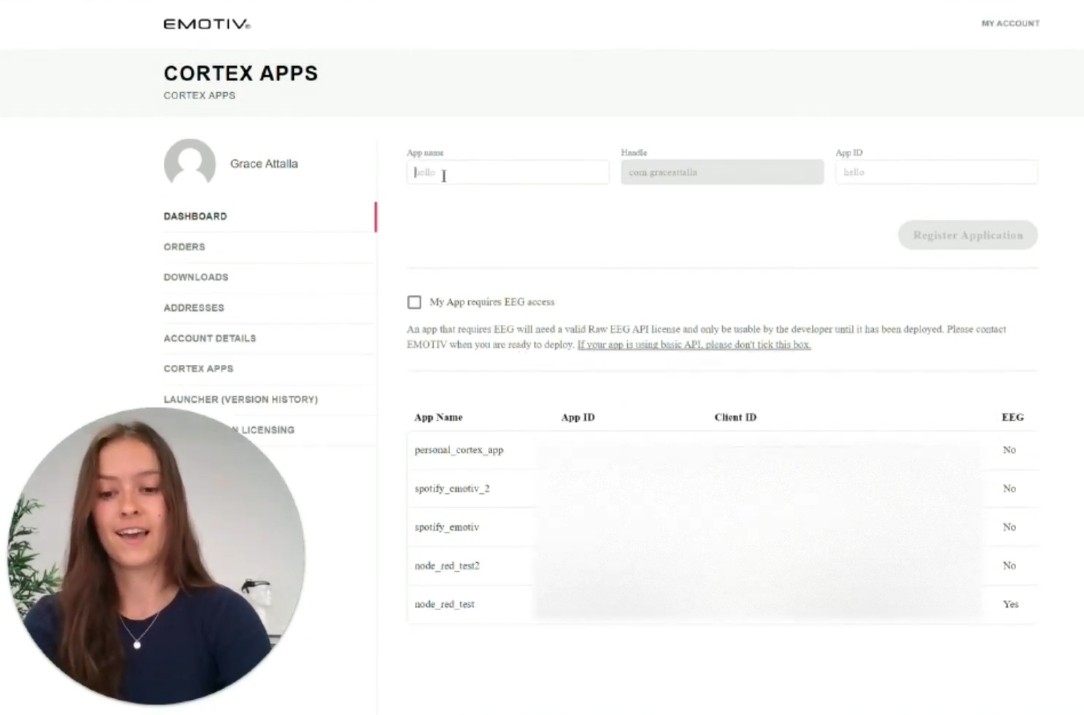
Our API uses the industry-standard OAuth 2.0 protocol to handle authentication securely. Your first step is to register your application within your Emotiv account to get a unique client ID and client secret. These credentials act like a username and password for your application. You’ll use them to request an access token, which is the temporary key that grants you access to make API calls. This token-based system is a secure way to interact with our API without exposing your primary credentials. You can find everything you need to get started on our developer page.
Configure Request Headers
Once you have an access token, you need to include it with every API request you make. You do this by adding it to the Authorization header of your request. The format is standard for this type of authentication: Authorization: Bearer <your_access_token>. Placing the token in the header is the conventional and secure way to present your credentials. It’s a critical step, because without a valid token in the header, our server will be unable to verify your request and will return an error. For specific examples, our API documentation provides clear instructions for every endpoint.
Follow Security Best Practices
Your API credentials, including your client ID, client secret, and access tokens, are sensitive information. You should always treat them with the same care as a password. Never hardcode them directly into your application, especially in client-side code that can be easily exposed. A much safer approach is to store them in environment variables on your server. It’s also wise to understand our API’s rate limits to prevent your application from being temporarily blocked. Following these security fundamentals helps you build a reliable application while protecting user data and ensuring a stable connection to our platform.
Which "Cortex" API Do You Need?
If you’re searching for the "Cortex API," you might find yourself looking at a few different options. The name "Cortex" is used by several major tech companies for entirely different products, which can make finding the right documentation a little tricky. Before you get started on your project, it’s important to know which Cortex platform you’re actually working with. The two most common ones you'll encounter are from Snowflake and Palo Alto Networks, each serving a completely different purpose. Let's break down what each one does so you can find the right tool for your needs.
Snowflake Cortex for AI Integration
If your goal is to build applications with large language models (LLMs), the Snowflake Cortex REST API is likely the one you need. This API allows you to use powerful AI models from providers like Meta, OpenAI, and Anthropic directly within your Snowflake environment. The major benefit here is that your data remains secure within Snowflake’s system while you access these advanced AI capabilities. To get started, you’ll need your Snowflake account address, a Programmatic Access Token (PAT), and the name of the specific AI model you plan to use.
Palo Alto Networks Cortex XDR for Security
On the other hand, if you're working in cybersecurity, you’re probably looking for the Cortex XDR REST API. This API is part of a modern security platform that uses artificial intelligence to detect, investigate, and respond to sophisticated cyber threats. It’s designed to help security teams automate their workflows and manage security incidents more effectively. Unlike the Snowflake API, this tool is focused entirely on protecting your organization’s digital assets, not on integrating generative AI models for application development.
Choose the Right API for Your Project
Choosing the right API starts with clearly defining your project's goal. Are you integrating AI features into an application, or are you building a security solution? Once you know your objective, the choice becomes much clearer. The best next step is to carefully review the official documentation for the API you think you need. Good API documentation will quickly tell you if the tool’s capabilities align with your project, saving you time and preventing headaches down the road.
How to Use the Cortex API Documentation
Once you’ve identified which "Cortex" API you need, the next step is to get familiar with its documentation. API documentation is your map for any project, showing you exactly how to make requests, what data to expect in return, and how to handle any issues that come up. While each set of documentation is unique, they generally share a common goal: to give you the information you need to start building as quickly as possible.
Think of it as a user manual for developers. A good one will provide clear examples, define all the available functions, and explain the authentication process. Let’s look at the structure of the documentation for the two most common non-Emotiv "Cortex" APIs so you know what to expect.
The Snowflake Cortex Documentation Layout
The Snowflake Cortex documentation is designed for developers who want to integrate AI models directly within the Snowflake data platform. The Cortex REST API allows you to use models from providers like OpenAI and Meta without your data ever leaving Snowflake’s secure environment. The documentation starts by outlining the prerequisites. Before you begin, you’ll need your Snowflake account address, a Programmatic Access Token (PAT) for authentication, and the name of the specific AI model you plan to use. The layout is straightforward, guiding you through setup and providing clear endpoints for interacting with the AI models.
The Palo Alto Networks Cortex XDR Documentation Layout
If your work involves cybersecurity, you might be looking at the Palo Alto Networks documentation. This is a comprehensive API reference guide for the Cortex XDR (Extended Detection and Response) platform. Its purpose is to give you detailed instructions on how to programmatically manage security incidents, endpoints, and data. The documentation is organized by API function, such as retrieving alerts or isolating a device. Each entry provides the specific request format, required parameters, and example responses. This structure helps you quickly find the exact command you need to automate your security workflows and integrate Cortex XDR with other tools.
Find the Correct API Reference
No matter which API you're using, finding the right reference material is key. Start by looking for a "Getting Started" guide or an "API Reference" section. This is where you'll typically find core information on authentication, endpoints, and data formats. For example, documentation will explain how to access different parts of the platform, like entities or workflows. It will also cover important details like rate limits. If you send too many requests in a short period, you’ll likely get a "429" error. Good documentation will tell you what the limits are and how long you should wait before trying again.
What Are the Cortex API Rate Limits?
When you work with any API, you'll encounter rate limits. These are rules that ensure the service remains stable for everyone by preventing any single application from overwhelming the system. The specific limits differ depending on which 'Cortex' API you're using, so always check the official documentation for your platform, whether it's Snowflake Cortex or Palo Alto Networks Cortex XDR. Understanding these concepts is fundamental to building reliable applications with any API, including our own developer tools. Let's look at some common limits you might see.
Requests Per Minute
A common limit is the number of requests you can make per minute. This controls the frequency of your API calls. For instance, some API documentation states a limit of 1,000 requests per minute per user. This means your application must stay under this threshold. If your app needs to pull data frequently, you'll have to manage your calls carefully to avoid being temporarily blocked. It's a good practice to build error handling that can gracefully pause and retry if you hit this limit.
Maximum Request Size
Another limit is the maximum size of each request, which is the amount of data you can send in a single call. For example, some APIs cap this at 2 megabytes (MB). This prevents a single, massive request from slowing down the server. If you need to send a large amount of data, you might have to break it into smaller chunks across multiple requests. Always check the documentation for the specific API you're using to understand its payload size limitations and plan accordingly.
Plan Your API Usage
If you exceed these limits, you'll typically receive an error response, often with a status code like 429 Too Many Requests. Your application should be built to handle these responses. If you frequently hit the rate limits, it's a sign you may need to optimize your code or upgrade your service plan. Most API providers suggest reaching out if you consistently need more capacity. This is a good rule of thumb for any API integration you build, as proactive communication can solve scaling issues before they become critical.
How to Work with Data in Cortex APIs
Once you've authenticated your requests, the next step is working with the data. How you do this depends entirely on which "Cortex" API you're using. The Snowflake Cortex API is designed for large-scale data analysis and AI model integration, while the Palo Alto Networks Cortex XDR API is focused on cybersecurity operations. Each has its own methods for sending requests and specific data formats for responses. Let's look at how you can interact with the data from each platform.
Process Data with Snowflake Cortex
The Snowflake Cortex API brings powerful AI directly to your data. Instead of exporting sensitive information to an external service, you can use the Cortex REST API to run large language models from providers like OpenAI and Meta right inside your Snowflake environment. This is a huge advantage for security and efficiency. You can send data to these models for tasks like summarization or sentiment analysis and get results back without your data ever leaving the Snowflake ecosystem. It’s a streamlined way to add advanced AI capabilities to your data workflows.
Manage Security Incidents with Palo Alto Cortex
If you're in cybersecurity, the Palo Alto Networks Cortex XDR API is your tool for automating security tasks. This API lets you programmatically interact with your security data, which is essential for managing incidents. You can use it to retrieve details about alerts, update incident statuses, or even isolate an affected device from the network. The API reference guide provides all the endpoints you need to build custom scripts or integrate Cortex XDR data into other security platforms. This helps security teams respond to threats faster and more consistently.
Understand API Response Formats
Regardless of which API you use, understanding the response format is key to making the data usable. Most modern APIs, including Snowflake's, return data in a structured format like JSON (JavaScript Object Notation). This is helpful because it’s lightweight and simple for machines to parse. For example, you can ask an AI model in Snowflake to return its answer as a JSON file, which makes it much easier to feed that output directly into another part of your program. Always check the documentation for the specific API you're using to see what data formats it supports.
Key Cortex API Features
Our Cortex API is designed to give you direct, real-time access to brain data from Emotiv headsets. It acts as the bridge between our hardware and your software, providing a powerful toolkit for building applications that interact with the human brain. We created it to make complex brain data accessible, so you can focus on what you do best: innovating. Whether you're a researcher in an academic setting, a developer building the next generation of interactive experiences, or a creator exploring new cognitive wellness tools, the API has features built to make your work easier and more efficient. It handles the heavy lifting of data acquisition and initial processing, translating raw brain signals into understandable metrics. This means you can spend less time on setup and more time creating. From simple biofeedback apps to sophisticated control systems for a brain-computer interface, the Cortex API provides the stable foundation you need. It’s built for flexibility, allowing you to pull exactly the data you need, when you need it, without overwhelming your application with unnecessary information. This efficiency is crucial for creating smooth, responsive user experiences. Let's look at a few key features that help you get the most out of our ecosystem.
Stream Real-Time Responses
One of the most powerful features of the Cortex API is its ability to stream data in real time. Instead of waiting for a data file to be recorded and processed, you can subscribe to live data streams directly from an Emotiv headset. This allows your application to react instantly to a user's mental state or facial expressions. You can access raw EEG data, performance metrics like focus and stress, motion sensor data, and more. This real-time capability is essential for creating interactive and responsive applications, from biofeedback tools to hands-free control systems. Our developer resources provide everything you need to start working with these data streams.
Use Structured Output Options
To make integration as smooth as possible, the Cortex API communicates using JSON (JavaScript Object Notation). This is a lightweight, human-readable data format that is easy for any programming language to parse. By providing data in a structured format, we save you the trouble of writing complex code to interpret the API’s responses. This means you can quickly incorporate brain data into your existing projects, whether you're building a web app, a mobile game, or a scientific analysis tool. This standardized approach is part of what makes it possible to build powerful tools like our EmotivBCI software.
Optimize Error Handling and Responses
When you're developing an application, clear communication is key, especially when things don't go as planned. The Cortex API includes a robust system for error handling that provides specific, informative error codes. If a request fails because a headset isn't connected or a parameter is incorrect, the API will tell you exactly what went wrong. This detailed feedback helps you troubleshoot issues quickly and build more reliable software. Instead of guessing what the problem is, you can use the error codes to pinpoint the issue and guide your user toward a solution, creating a much better overall experience.
Cortex API Best Practices
Working with any new API comes with a bit of a learning curve. But by following a few key best practices from the start, you can build more stable, efficient, and user-friendly applications. Think of these tips as your roadmap to avoiding common roadblocks and making your development process much smoother. Instead of reacting to problems as they pop up, you can build a solid foundation that anticipates challenges and handles them gracefully. Let’s walk through a few essential strategies for error handling, response optimization, and debugging that will help you get the most out of the Cortex API you’re working with. These practices are fundamental whether you're integrating AI features or managing security data, and they'll save you plenty of time and frustration down the line.
Create an Error Handling Strategy
A solid error handling strategy is your best friend when developing with an API. One of the most common hiccups you might encounter is sending too many requests in a short amount of time. This can trigger a '429' error, which is the API's way of telling you to slow down. Instead of seeing this as a roadblock, view it as a helpful guide. The error message itself often tells you how long you should wait before trying again. By building logic into your application to listen for these messages and pause accordingly, you can create a more resilient system that respects the API's rate limits and provides a much smoother experience for your users.
Optimize Your Responses
To make your application feel snappy and responsive, it’s a good idea to optimize how you handle API responses. For instance, the Snowflake Cortex API has a great feature that lets you receive AI-generated responses incrementally. This means you don’t have to wait for the entire answer to be generated before showing something to your user. You can stream the response as it comes in, which provides immediate feedback and makes your application feel much more interactive. This approach can dramatically improve the user experience, especially for tasks that might take a few moments to complete on the back end.
Debug Common Issues
When you hit a snag, it’s often due to a simple, common issue. With the Snowflake Cortex API, one of the first things to check is permissions. To access the API, your Snowflake role needs to have the SNOWFLAKE.CORTEX_USER permission. While this is usually granted by default, it can sometimes be overlooked in custom setups. If you’re running into unexpected access errors, this is a great place to start your debugging. A quick chat with your Snowflake administrator can help confirm that your role has the necessary permissions, often resolving the issue in just a few minutes.
Related Articles
Frequently Asked Questions
Why are there so many different APIs named "Cortex?" It can definitely be confusing, but it's mostly a coincidence. "Cortex" is a popular name in tech because it relates to the brain, which suggests intelligence and processing. The three main APIs you'll see are all for very different things. The Snowflake Cortex API is for integrating AI models into data applications, the Palo Alto Networks Cortex XDR API is for cybersecurity, and our Emotiv Cortex API is specifically for accessing brain data from our EEG headsets.
What kinds of things can I build with the Emotiv Cortex API? Our API gives you the tools to create applications that respond to a person's cognitive and emotional states in real time. You could design an interactive art installation that changes based on a user's focus, develop custom biofeedback applications, or create new hands-free controls for assistive technology. It’s all about using the data streams from our headsets as a new kind of input for your software projects.
I'm new to this. What's the very first step to using an API? The best place to start is always with the official documentation. Look for a "Getting Started" guide, which will walk you through the most important first step: authentication. This is where you'll register your application to get a unique set of credentials. These keys prove that your app has permission to request data, and they are essential for making any successful API calls.
What should I do if I get a "429 Too Many Requests" error? Don't worry, this is a very common error when working with APIs. It's simply the server's way of telling you to slow down a bit. Rate limits exist to keep the service stable for all users. The best practice is to build logic into your code that recognizes this error, pauses for a short period (often the API's response will suggest how long), and then tries the request again.
Why do these APIs use the JSON format for sending data? JSON is the standard because it's a simple, lightweight, and universal way to structure data. It organizes information using key-value pairs, which is very easy for almost any programming language to read and understand. This means you can spend less time writing code to interpret the API's response and more time using that data to build great features in your application.
As a developer, you know that the first step in any new integration is diving into the documentation. But what happens when the API you’re looking for shares its name with several other major platforms? That’s the exact situation with the “Cortex API.” Depending on your project, you could be looking for tools related to brain-computer interfaces, AI and large language models, or cybersecurity. Each of these platforms is completely different, with its own set of rules, endpoints, and authentication methods. Before you get lost in the wrong manual, this guide will help you identify the right cortex api documentation for your specific needs.
Key Takeaways
Confirm which "Cortex" you need: The name is used by different companies for very different purposes. Emotiv's API is for brain data, Snowflake's is for AI integration, and Palo Alto Networks' is for cybersecurity.
Master the documentation and error handling: Your success with any API depends on understanding its documentation, securing your credentials, and building a solid plan to manage rate limits and potential errors.
Use Emotiv's API for real-time brain data: Our Cortex API streams live data from Emotiv headsets using a simple JSON format, giving you a powerful foundation for creating applications for research, BCI, or cognitive wellness tools.
What Is the Cortex API?
If you're searching for the "Cortex API," you've likely found that the name can refer to a few different technologies. It's a common point of confusion, so let's clarify what each one does. At its core, an API (Application Programming Interface) is a set of rules that allows different software programs to communicate with each other. It’s what lets a developer use features from another service without having to build them from the ground up.
Here at Emotiv, our own Cortex service is the API that allows developers to interact with our EEG headsets and access brain data streams. However, other major platforms also use the "Cortex" name for their APIs, particularly in data science and cybersecurity. This article will walk you through the main ones to help you find the right documentation for your project.
One of the most prominent is the Cortex API from Snowflake, a cloud data platform. This is a powerful REST API that lets you programmatically connect to and control the Snowflake Cortex platform. Developers use it to manage items, track performance, and automate complex tasks through workflows. The documentation is interactive, which is a great feature that lets you test operations directly in your browser to see how they work before writing any code.
The Cortex Platform Ecosystem
The Snowflake Cortex ecosystem is built around integrating powerful AI and Large Language Models (LLMs) directly into its data cloud. Through its REST API, you can access advanced models from leading companies like Anthropic, OpenAI, and Meta without your data ever leaving the secure Snowflake environment. This is a significant advantage for data privacy and governance. The platform offers a wide range of models from different providers, giving you the flexibility to choose the best one for your specific task. These models are accessible across various cloud platforms, including AWS and Azure, making it a versatile tool for developers working in different environments.
Core API Capabilities for Developers
For developers, the Snowflake Cortex API provides a suite of features designed to build sophisticated applications. Key capabilities include streaming responses, which lets you receive data as it's generated instead of waiting for the full output. It also supports tool calling and structured output, giving you more control over how the AI processes information and formats its answers. You can even use image inputs for multimodal applications. The API also includes performance optimizations like prompt caching to make your requests more efficient. To get started, you’ll need to manage authentication through a token system, including a specific token in the Authorization header of your requests to validate them.
How to Authenticate and Authorize API Requests
Before your application can start interacting with our platform, you need a way to prove it has permission to do so. This is where authentication and authorization come into play. Think of it as a digital handshake that ensures only approved applications can access brain data and other resources. This process is a crucial security measure that protects user data and the integrity of our system. It’s a straightforward process that involves using a unique set of credentials to identify your application with every request you send.
Set Up API Key Authentication
Our API uses the industry-standard OAuth 2.0 protocol to handle authentication securely. Your first step is to register your application within your Emotiv account to get a unique client ID and client secret. These credentials act like a username and password for your application. You’ll use them to request an access token, which is the temporary key that grants you access to make API calls. This token-based system is a secure way to interact with our API without exposing your primary credentials. You can find everything you need to get started on our developer page.
Configure Request Headers
Once you have an access token, you need to include it with every API request you make. You do this by adding it to the Authorization header of your request. The format is standard for this type of authentication: Authorization: Bearer <your_access_token>. Placing the token in the header is the conventional and secure way to present your credentials. It’s a critical step, because without a valid token in the header, our server will be unable to verify your request and will return an error. For specific examples, our API documentation provides clear instructions for every endpoint.
Follow Security Best Practices
Your API credentials, including your client ID, client secret, and access tokens, are sensitive information. You should always treat them with the same care as a password. Never hardcode them directly into your application, especially in client-side code that can be easily exposed. A much safer approach is to store them in environment variables on your server. It’s also wise to understand our API’s rate limits to prevent your application from being temporarily blocked. Following these security fundamentals helps you build a reliable application while protecting user data and ensuring a stable connection to our platform.
Which "Cortex" API Do You Need?
If you’re searching for the "Cortex API," you might find yourself looking at a few different options. The name "Cortex" is used by several major tech companies for entirely different products, which can make finding the right documentation a little tricky. Before you get started on your project, it’s important to know which Cortex platform you’re actually working with. The two most common ones you'll encounter are from Snowflake and Palo Alto Networks, each serving a completely different purpose. Let's break down what each one does so you can find the right tool for your needs.
Snowflake Cortex for AI Integration
If your goal is to build applications with large language models (LLMs), the Snowflake Cortex REST API is likely the one you need. This API allows you to use powerful AI models from providers like Meta, OpenAI, and Anthropic directly within your Snowflake environment. The major benefit here is that your data remains secure within Snowflake’s system while you access these advanced AI capabilities. To get started, you’ll need your Snowflake account address, a Programmatic Access Token (PAT), and the name of the specific AI model you plan to use.
Palo Alto Networks Cortex XDR for Security
On the other hand, if you're working in cybersecurity, you’re probably looking for the Cortex XDR REST API. This API is part of a modern security platform that uses artificial intelligence to detect, investigate, and respond to sophisticated cyber threats. It’s designed to help security teams automate their workflows and manage security incidents more effectively. Unlike the Snowflake API, this tool is focused entirely on protecting your organization’s digital assets, not on integrating generative AI models for application development.
Choose the Right API for Your Project
Choosing the right API starts with clearly defining your project's goal. Are you integrating AI features into an application, or are you building a security solution? Once you know your objective, the choice becomes much clearer. The best next step is to carefully review the official documentation for the API you think you need. Good API documentation will quickly tell you if the tool’s capabilities align with your project, saving you time and preventing headaches down the road.
How to Use the Cortex API Documentation
Once you’ve identified which "Cortex" API you need, the next step is to get familiar with its documentation. API documentation is your map for any project, showing you exactly how to make requests, what data to expect in return, and how to handle any issues that come up. While each set of documentation is unique, they generally share a common goal: to give you the information you need to start building as quickly as possible.
Think of it as a user manual for developers. A good one will provide clear examples, define all the available functions, and explain the authentication process. Let’s look at the structure of the documentation for the two most common non-Emotiv "Cortex" APIs so you know what to expect.
The Snowflake Cortex Documentation Layout
The Snowflake Cortex documentation is designed for developers who want to integrate AI models directly within the Snowflake data platform. The Cortex REST API allows you to use models from providers like OpenAI and Meta without your data ever leaving Snowflake’s secure environment. The documentation starts by outlining the prerequisites. Before you begin, you’ll need your Snowflake account address, a Programmatic Access Token (PAT) for authentication, and the name of the specific AI model you plan to use. The layout is straightforward, guiding you through setup and providing clear endpoints for interacting with the AI models.
The Palo Alto Networks Cortex XDR Documentation Layout
If your work involves cybersecurity, you might be looking at the Palo Alto Networks documentation. This is a comprehensive API reference guide for the Cortex XDR (Extended Detection and Response) platform. Its purpose is to give you detailed instructions on how to programmatically manage security incidents, endpoints, and data. The documentation is organized by API function, such as retrieving alerts or isolating a device. Each entry provides the specific request format, required parameters, and example responses. This structure helps you quickly find the exact command you need to automate your security workflows and integrate Cortex XDR with other tools.
Find the Correct API Reference
No matter which API you're using, finding the right reference material is key. Start by looking for a "Getting Started" guide or an "API Reference" section. This is where you'll typically find core information on authentication, endpoints, and data formats. For example, documentation will explain how to access different parts of the platform, like entities or workflows. It will also cover important details like rate limits. If you send too many requests in a short period, you’ll likely get a "429" error. Good documentation will tell you what the limits are and how long you should wait before trying again.
What Are the Cortex API Rate Limits?
When you work with any API, you'll encounter rate limits. These are rules that ensure the service remains stable for everyone by preventing any single application from overwhelming the system. The specific limits differ depending on which 'Cortex' API you're using, so always check the official documentation for your platform, whether it's Snowflake Cortex or Palo Alto Networks Cortex XDR. Understanding these concepts is fundamental to building reliable applications with any API, including our own developer tools. Let's look at some common limits you might see.
Requests Per Minute
A common limit is the number of requests you can make per minute. This controls the frequency of your API calls. For instance, some API documentation states a limit of 1,000 requests per minute per user. This means your application must stay under this threshold. If your app needs to pull data frequently, you'll have to manage your calls carefully to avoid being temporarily blocked. It's a good practice to build error handling that can gracefully pause and retry if you hit this limit.
Maximum Request Size
Another limit is the maximum size of each request, which is the amount of data you can send in a single call. For example, some APIs cap this at 2 megabytes (MB). This prevents a single, massive request from slowing down the server. If you need to send a large amount of data, you might have to break it into smaller chunks across multiple requests. Always check the documentation for the specific API you're using to understand its payload size limitations and plan accordingly.
Plan Your API Usage
If you exceed these limits, you'll typically receive an error response, often with a status code like 429 Too Many Requests. Your application should be built to handle these responses. If you frequently hit the rate limits, it's a sign you may need to optimize your code or upgrade your service plan. Most API providers suggest reaching out if you consistently need more capacity. This is a good rule of thumb for any API integration you build, as proactive communication can solve scaling issues before they become critical.
How to Work with Data in Cortex APIs
Once you've authenticated your requests, the next step is working with the data. How you do this depends entirely on which "Cortex" API you're using. The Snowflake Cortex API is designed for large-scale data analysis and AI model integration, while the Palo Alto Networks Cortex XDR API is focused on cybersecurity operations. Each has its own methods for sending requests and specific data formats for responses. Let's look at how you can interact with the data from each platform.
Process Data with Snowflake Cortex
The Snowflake Cortex API brings powerful AI directly to your data. Instead of exporting sensitive information to an external service, you can use the Cortex REST API to run large language models from providers like OpenAI and Meta right inside your Snowflake environment. This is a huge advantage for security and efficiency. You can send data to these models for tasks like summarization or sentiment analysis and get results back without your data ever leaving the Snowflake ecosystem. It’s a streamlined way to add advanced AI capabilities to your data workflows.
Manage Security Incidents with Palo Alto Cortex
If you're in cybersecurity, the Palo Alto Networks Cortex XDR API is your tool for automating security tasks. This API lets you programmatically interact with your security data, which is essential for managing incidents. You can use it to retrieve details about alerts, update incident statuses, or even isolate an affected device from the network. The API reference guide provides all the endpoints you need to build custom scripts or integrate Cortex XDR data into other security platforms. This helps security teams respond to threats faster and more consistently.
Understand API Response Formats
Regardless of which API you use, understanding the response format is key to making the data usable. Most modern APIs, including Snowflake's, return data in a structured format like JSON (JavaScript Object Notation). This is helpful because it’s lightweight and simple for machines to parse. For example, you can ask an AI model in Snowflake to return its answer as a JSON file, which makes it much easier to feed that output directly into another part of your program. Always check the documentation for the specific API you're using to see what data formats it supports.
Key Cortex API Features
Our Cortex API is designed to give you direct, real-time access to brain data from Emotiv headsets. It acts as the bridge between our hardware and your software, providing a powerful toolkit for building applications that interact with the human brain. We created it to make complex brain data accessible, so you can focus on what you do best: innovating. Whether you're a researcher in an academic setting, a developer building the next generation of interactive experiences, or a creator exploring new cognitive wellness tools, the API has features built to make your work easier and more efficient. It handles the heavy lifting of data acquisition and initial processing, translating raw brain signals into understandable metrics. This means you can spend less time on setup and more time creating. From simple biofeedback apps to sophisticated control systems for a brain-computer interface, the Cortex API provides the stable foundation you need. It’s built for flexibility, allowing you to pull exactly the data you need, when you need it, without overwhelming your application with unnecessary information. This efficiency is crucial for creating smooth, responsive user experiences. Let's look at a few key features that help you get the most out of our ecosystem.
Stream Real-Time Responses
One of the most powerful features of the Cortex API is its ability to stream data in real time. Instead of waiting for a data file to be recorded and processed, you can subscribe to live data streams directly from an Emotiv headset. This allows your application to react instantly to a user's mental state or facial expressions. You can access raw EEG data, performance metrics like focus and stress, motion sensor data, and more. This real-time capability is essential for creating interactive and responsive applications, from biofeedback tools to hands-free control systems. Our developer resources provide everything you need to start working with these data streams.
Use Structured Output Options
To make integration as smooth as possible, the Cortex API communicates using JSON (JavaScript Object Notation). This is a lightweight, human-readable data format that is easy for any programming language to parse. By providing data in a structured format, we save you the trouble of writing complex code to interpret the API’s responses. This means you can quickly incorporate brain data into your existing projects, whether you're building a web app, a mobile game, or a scientific analysis tool. This standardized approach is part of what makes it possible to build powerful tools like our EmotivBCI software.
Optimize Error Handling and Responses
When you're developing an application, clear communication is key, especially when things don't go as planned. The Cortex API includes a robust system for error handling that provides specific, informative error codes. If a request fails because a headset isn't connected or a parameter is incorrect, the API will tell you exactly what went wrong. This detailed feedback helps you troubleshoot issues quickly and build more reliable software. Instead of guessing what the problem is, you can use the error codes to pinpoint the issue and guide your user toward a solution, creating a much better overall experience.
Cortex API Best Practices
Working with any new API comes with a bit of a learning curve. But by following a few key best practices from the start, you can build more stable, efficient, and user-friendly applications. Think of these tips as your roadmap to avoiding common roadblocks and making your development process much smoother. Instead of reacting to problems as they pop up, you can build a solid foundation that anticipates challenges and handles them gracefully. Let’s walk through a few essential strategies for error handling, response optimization, and debugging that will help you get the most out of the Cortex API you’re working with. These practices are fundamental whether you're integrating AI features or managing security data, and they'll save you plenty of time and frustration down the line.
Create an Error Handling Strategy
A solid error handling strategy is your best friend when developing with an API. One of the most common hiccups you might encounter is sending too many requests in a short amount of time. This can trigger a '429' error, which is the API's way of telling you to slow down. Instead of seeing this as a roadblock, view it as a helpful guide. The error message itself often tells you how long you should wait before trying again. By building logic into your application to listen for these messages and pause accordingly, you can create a more resilient system that respects the API's rate limits and provides a much smoother experience for your users.
Optimize Your Responses
To make your application feel snappy and responsive, it’s a good idea to optimize how you handle API responses. For instance, the Snowflake Cortex API has a great feature that lets you receive AI-generated responses incrementally. This means you don’t have to wait for the entire answer to be generated before showing something to your user. You can stream the response as it comes in, which provides immediate feedback and makes your application feel much more interactive. This approach can dramatically improve the user experience, especially for tasks that might take a few moments to complete on the back end.
Debug Common Issues
When you hit a snag, it’s often due to a simple, common issue. With the Snowflake Cortex API, one of the first things to check is permissions. To access the API, your Snowflake role needs to have the SNOWFLAKE.CORTEX_USER permission. While this is usually granted by default, it can sometimes be overlooked in custom setups. If you’re running into unexpected access errors, this is a great place to start your debugging. A quick chat with your Snowflake administrator can help confirm that your role has the necessary permissions, often resolving the issue in just a few minutes.
Related Articles
Frequently Asked Questions
Why are there so many different APIs named "Cortex?" It can definitely be confusing, but it's mostly a coincidence. "Cortex" is a popular name in tech because it relates to the brain, which suggests intelligence and processing. The three main APIs you'll see are all for very different things. The Snowflake Cortex API is for integrating AI models into data applications, the Palo Alto Networks Cortex XDR API is for cybersecurity, and our Emotiv Cortex API is specifically for accessing brain data from our EEG headsets.
What kinds of things can I build with the Emotiv Cortex API? Our API gives you the tools to create applications that respond to a person's cognitive and emotional states in real time. You could design an interactive art installation that changes based on a user's focus, develop custom biofeedback applications, or create new hands-free controls for assistive technology. It’s all about using the data streams from our headsets as a new kind of input for your software projects.
I'm new to this. What's the very first step to using an API? The best place to start is always with the official documentation. Look for a "Getting Started" guide, which will walk you through the most important first step: authentication. This is where you'll register your application to get a unique set of credentials. These keys prove that your app has permission to request data, and they are essential for making any successful API calls.
What should I do if I get a "429 Too Many Requests" error? Don't worry, this is a very common error when working with APIs. It's simply the server's way of telling you to slow down a bit. Rate limits exist to keep the service stable for all users. The best practice is to build logic into your code that recognizes this error, pauses for a short period (often the API's response will suggest how long), and then tries the request again.
Why do these APIs use the JSON format for sending data? JSON is the standard because it's a simple, lightweight, and universal way to structure data. It organizes information using key-value pairs, which is very easy for almost any programming language to read and understand. This means you can spend less time writing code to interpret the API's response and more time using that data to build great features in your application.
As a developer, you know that the first step in any new integration is diving into the documentation. But what happens when the API you’re looking for shares its name with several other major platforms? That’s the exact situation with the “Cortex API.” Depending on your project, you could be looking for tools related to brain-computer interfaces, AI and large language models, or cybersecurity. Each of these platforms is completely different, with its own set of rules, endpoints, and authentication methods. Before you get lost in the wrong manual, this guide will help you identify the right cortex api documentation for your specific needs.
Key Takeaways
Confirm which "Cortex" you need: The name is used by different companies for very different purposes. Emotiv's API is for brain data, Snowflake's is for AI integration, and Palo Alto Networks' is for cybersecurity.
Master the documentation and error handling: Your success with any API depends on understanding its documentation, securing your credentials, and building a solid plan to manage rate limits and potential errors.
Use Emotiv's API for real-time brain data: Our Cortex API streams live data from Emotiv headsets using a simple JSON format, giving you a powerful foundation for creating applications for research, BCI, or cognitive wellness tools.
What Is the Cortex API?
If you're searching for the "Cortex API," you've likely found that the name can refer to a few different technologies. It's a common point of confusion, so let's clarify what each one does. At its core, an API (Application Programming Interface) is a set of rules that allows different software programs to communicate with each other. It’s what lets a developer use features from another service without having to build them from the ground up.
Here at Emotiv, our own Cortex service is the API that allows developers to interact with our EEG headsets and access brain data streams. However, other major platforms also use the "Cortex" name for their APIs, particularly in data science and cybersecurity. This article will walk you through the main ones to help you find the right documentation for your project.
One of the most prominent is the Cortex API from Snowflake, a cloud data platform. This is a powerful REST API that lets you programmatically connect to and control the Snowflake Cortex platform. Developers use it to manage items, track performance, and automate complex tasks through workflows. The documentation is interactive, which is a great feature that lets you test operations directly in your browser to see how they work before writing any code.
The Cortex Platform Ecosystem
The Snowflake Cortex ecosystem is built around integrating powerful AI and Large Language Models (LLMs) directly into its data cloud. Through its REST API, you can access advanced models from leading companies like Anthropic, OpenAI, and Meta without your data ever leaving the secure Snowflake environment. This is a significant advantage for data privacy and governance. The platform offers a wide range of models from different providers, giving you the flexibility to choose the best one for your specific task. These models are accessible across various cloud platforms, including AWS and Azure, making it a versatile tool for developers working in different environments.
Core API Capabilities for Developers
For developers, the Snowflake Cortex API provides a suite of features designed to build sophisticated applications. Key capabilities include streaming responses, which lets you receive data as it's generated instead of waiting for the full output. It also supports tool calling and structured output, giving you more control over how the AI processes information and formats its answers. You can even use image inputs for multimodal applications. The API also includes performance optimizations like prompt caching to make your requests more efficient. To get started, you’ll need to manage authentication through a token system, including a specific token in the Authorization header of your requests to validate them.
How to Authenticate and Authorize API Requests
Before your application can start interacting with our platform, you need a way to prove it has permission to do so. This is where authentication and authorization come into play. Think of it as a digital handshake that ensures only approved applications can access brain data and other resources. This process is a crucial security measure that protects user data and the integrity of our system. It’s a straightforward process that involves using a unique set of credentials to identify your application with every request you send.
Set Up API Key Authentication
Our API uses the industry-standard OAuth 2.0 protocol to handle authentication securely. Your first step is to register your application within your Emotiv account to get a unique client ID and client secret. These credentials act like a username and password for your application. You’ll use them to request an access token, which is the temporary key that grants you access to make API calls. This token-based system is a secure way to interact with our API without exposing your primary credentials. You can find everything you need to get started on our developer page.
Configure Request Headers
Once you have an access token, you need to include it with every API request you make. You do this by adding it to the Authorization header of your request. The format is standard for this type of authentication: Authorization: Bearer <your_access_token>. Placing the token in the header is the conventional and secure way to present your credentials. It’s a critical step, because without a valid token in the header, our server will be unable to verify your request and will return an error. For specific examples, our API documentation provides clear instructions for every endpoint.
Follow Security Best Practices
Your API credentials, including your client ID, client secret, and access tokens, are sensitive information. You should always treat them with the same care as a password. Never hardcode them directly into your application, especially in client-side code that can be easily exposed. A much safer approach is to store them in environment variables on your server. It’s also wise to understand our API’s rate limits to prevent your application from being temporarily blocked. Following these security fundamentals helps you build a reliable application while protecting user data and ensuring a stable connection to our platform.
Which "Cortex" API Do You Need?
If you’re searching for the "Cortex API," you might find yourself looking at a few different options. The name "Cortex" is used by several major tech companies for entirely different products, which can make finding the right documentation a little tricky. Before you get started on your project, it’s important to know which Cortex platform you’re actually working with. The two most common ones you'll encounter are from Snowflake and Palo Alto Networks, each serving a completely different purpose. Let's break down what each one does so you can find the right tool for your needs.
Snowflake Cortex for AI Integration
If your goal is to build applications with large language models (LLMs), the Snowflake Cortex REST API is likely the one you need. This API allows you to use powerful AI models from providers like Meta, OpenAI, and Anthropic directly within your Snowflake environment. The major benefit here is that your data remains secure within Snowflake’s system while you access these advanced AI capabilities. To get started, you’ll need your Snowflake account address, a Programmatic Access Token (PAT), and the name of the specific AI model you plan to use.
Palo Alto Networks Cortex XDR for Security
On the other hand, if you're working in cybersecurity, you’re probably looking for the Cortex XDR REST API. This API is part of a modern security platform that uses artificial intelligence to detect, investigate, and respond to sophisticated cyber threats. It’s designed to help security teams automate their workflows and manage security incidents more effectively. Unlike the Snowflake API, this tool is focused entirely on protecting your organization’s digital assets, not on integrating generative AI models for application development.
Choose the Right API for Your Project
Choosing the right API starts with clearly defining your project's goal. Are you integrating AI features into an application, or are you building a security solution? Once you know your objective, the choice becomes much clearer. The best next step is to carefully review the official documentation for the API you think you need. Good API documentation will quickly tell you if the tool’s capabilities align with your project, saving you time and preventing headaches down the road.
How to Use the Cortex API Documentation
Once you’ve identified which "Cortex" API you need, the next step is to get familiar with its documentation. API documentation is your map for any project, showing you exactly how to make requests, what data to expect in return, and how to handle any issues that come up. While each set of documentation is unique, they generally share a common goal: to give you the information you need to start building as quickly as possible.
Think of it as a user manual for developers. A good one will provide clear examples, define all the available functions, and explain the authentication process. Let’s look at the structure of the documentation for the two most common non-Emotiv "Cortex" APIs so you know what to expect.
The Snowflake Cortex Documentation Layout
The Snowflake Cortex documentation is designed for developers who want to integrate AI models directly within the Snowflake data platform. The Cortex REST API allows you to use models from providers like OpenAI and Meta without your data ever leaving Snowflake’s secure environment. The documentation starts by outlining the prerequisites. Before you begin, you’ll need your Snowflake account address, a Programmatic Access Token (PAT) for authentication, and the name of the specific AI model you plan to use. The layout is straightforward, guiding you through setup and providing clear endpoints for interacting with the AI models.
The Palo Alto Networks Cortex XDR Documentation Layout
If your work involves cybersecurity, you might be looking at the Palo Alto Networks documentation. This is a comprehensive API reference guide for the Cortex XDR (Extended Detection and Response) platform. Its purpose is to give you detailed instructions on how to programmatically manage security incidents, endpoints, and data. The documentation is organized by API function, such as retrieving alerts or isolating a device. Each entry provides the specific request format, required parameters, and example responses. This structure helps you quickly find the exact command you need to automate your security workflows and integrate Cortex XDR with other tools.
Find the Correct API Reference
No matter which API you're using, finding the right reference material is key. Start by looking for a "Getting Started" guide or an "API Reference" section. This is where you'll typically find core information on authentication, endpoints, and data formats. For example, documentation will explain how to access different parts of the platform, like entities or workflows. It will also cover important details like rate limits. If you send too many requests in a short period, you’ll likely get a "429" error. Good documentation will tell you what the limits are and how long you should wait before trying again.
What Are the Cortex API Rate Limits?
When you work with any API, you'll encounter rate limits. These are rules that ensure the service remains stable for everyone by preventing any single application from overwhelming the system. The specific limits differ depending on which 'Cortex' API you're using, so always check the official documentation for your platform, whether it's Snowflake Cortex or Palo Alto Networks Cortex XDR. Understanding these concepts is fundamental to building reliable applications with any API, including our own developer tools. Let's look at some common limits you might see.
Requests Per Minute
A common limit is the number of requests you can make per minute. This controls the frequency of your API calls. For instance, some API documentation states a limit of 1,000 requests per minute per user. This means your application must stay under this threshold. If your app needs to pull data frequently, you'll have to manage your calls carefully to avoid being temporarily blocked. It's a good practice to build error handling that can gracefully pause and retry if you hit this limit.
Maximum Request Size
Another limit is the maximum size of each request, which is the amount of data you can send in a single call. For example, some APIs cap this at 2 megabytes (MB). This prevents a single, massive request from slowing down the server. If you need to send a large amount of data, you might have to break it into smaller chunks across multiple requests. Always check the documentation for the specific API you're using to understand its payload size limitations and plan accordingly.
Plan Your API Usage
If you exceed these limits, you'll typically receive an error response, often with a status code like 429 Too Many Requests. Your application should be built to handle these responses. If you frequently hit the rate limits, it's a sign you may need to optimize your code or upgrade your service plan. Most API providers suggest reaching out if you consistently need more capacity. This is a good rule of thumb for any API integration you build, as proactive communication can solve scaling issues before they become critical.
How to Work with Data in Cortex APIs
Once you've authenticated your requests, the next step is working with the data. How you do this depends entirely on which "Cortex" API you're using. The Snowflake Cortex API is designed for large-scale data analysis and AI model integration, while the Palo Alto Networks Cortex XDR API is focused on cybersecurity operations. Each has its own methods for sending requests and specific data formats for responses. Let's look at how you can interact with the data from each platform.
Process Data with Snowflake Cortex
The Snowflake Cortex API brings powerful AI directly to your data. Instead of exporting sensitive information to an external service, you can use the Cortex REST API to run large language models from providers like OpenAI and Meta right inside your Snowflake environment. This is a huge advantage for security and efficiency. You can send data to these models for tasks like summarization or sentiment analysis and get results back without your data ever leaving the Snowflake ecosystem. It’s a streamlined way to add advanced AI capabilities to your data workflows.
Manage Security Incidents with Palo Alto Cortex
If you're in cybersecurity, the Palo Alto Networks Cortex XDR API is your tool for automating security tasks. This API lets you programmatically interact with your security data, which is essential for managing incidents. You can use it to retrieve details about alerts, update incident statuses, or even isolate an affected device from the network. The API reference guide provides all the endpoints you need to build custom scripts or integrate Cortex XDR data into other security platforms. This helps security teams respond to threats faster and more consistently.
Understand API Response Formats
Regardless of which API you use, understanding the response format is key to making the data usable. Most modern APIs, including Snowflake's, return data in a structured format like JSON (JavaScript Object Notation). This is helpful because it’s lightweight and simple for machines to parse. For example, you can ask an AI model in Snowflake to return its answer as a JSON file, which makes it much easier to feed that output directly into another part of your program. Always check the documentation for the specific API you're using to see what data formats it supports.
Key Cortex API Features
Our Cortex API is designed to give you direct, real-time access to brain data from Emotiv headsets. It acts as the bridge between our hardware and your software, providing a powerful toolkit for building applications that interact with the human brain. We created it to make complex brain data accessible, so you can focus on what you do best: innovating. Whether you're a researcher in an academic setting, a developer building the next generation of interactive experiences, or a creator exploring new cognitive wellness tools, the API has features built to make your work easier and more efficient. It handles the heavy lifting of data acquisition and initial processing, translating raw brain signals into understandable metrics. This means you can spend less time on setup and more time creating. From simple biofeedback apps to sophisticated control systems for a brain-computer interface, the Cortex API provides the stable foundation you need. It’s built for flexibility, allowing you to pull exactly the data you need, when you need it, without overwhelming your application with unnecessary information. This efficiency is crucial for creating smooth, responsive user experiences. Let's look at a few key features that help you get the most out of our ecosystem.
Stream Real-Time Responses
One of the most powerful features of the Cortex API is its ability to stream data in real time. Instead of waiting for a data file to be recorded and processed, you can subscribe to live data streams directly from an Emotiv headset. This allows your application to react instantly to a user's mental state or facial expressions. You can access raw EEG data, performance metrics like focus and stress, motion sensor data, and more. This real-time capability is essential for creating interactive and responsive applications, from biofeedback tools to hands-free control systems. Our developer resources provide everything you need to start working with these data streams.
Use Structured Output Options
To make integration as smooth as possible, the Cortex API communicates using JSON (JavaScript Object Notation). This is a lightweight, human-readable data format that is easy for any programming language to parse. By providing data in a structured format, we save you the trouble of writing complex code to interpret the API’s responses. This means you can quickly incorporate brain data into your existing projects, whether you're building a web app, a mobile game, or a scientific analysis tool. This standardized approach is part of what makes it possible to build powerful tools like our EmotivBCI software.
Optimize Error Handling and Responses
When you're developing an application, clear communication is key, especially when things don't go as planned. The Cortex API includes a robust system for error handling that provides specific, informative error codes. If a request fails because a headset isn't connected or a parameter is incorrect, the API will tell you exactly what went wrong. This detailed feedback helps you troubleshoot issues quickly and build more reliable software. Instead of guessing what the problem is, you can use the error codes to pinpoint the issue and guide your user toward a solution, creating a much better overall experience.
Cortex API Best Practices
Working with any new API comes with a bit of a learning curve. But by following a few key best practices from the start, you can build more stable, efficient, and user-friendly applications. Think of these tips as your roadmap to avoiding common roadblocks and making your development process much smoother. Instead of reacting to problems as they pop up, you can build a solid foundation that anticipates challenges and handles them gracefully. Let’s walk through a few essential strategies for error handling, response optimization, and debugging that will help you get the most out of the Cortex API you’re working with. These practices are fundamental whether you're integrating AI features or managing security data, and they'll save you plenty of time and frustration down the line.
Create an Error Handling Strategy
A solid error handling strategy is your best friend when developing with an API. One of the most common hiccups you might encounter is sending too many requests in a short amount of time. This can trigger a '429' error, which is the API's way of telling you to slow down. Instead of seeing this as a roadblock, view it as a helpful guide. The error message itself often tells you how long you should wait before trying again. By building logic into your application to listen for these messages and pause accordingly, you can create a more resilient system that respects the API's rate limits and provides a much smoother experience for your users.
Optimize Your Responses
To make your application feel snappy and responsive, it’s a good idea to optimize how you handle API responses. For instance, the Snowflake Cortex API has a great feature that lets you receive AI-generated responses incrementally. This means you don’t have to wait for the entire answer to be generated before showing something to your user. You can stream the response as it comes in, which provides immediate feedback and makes your application feel much more interactive. This approach can dramatically improve the user experience, especially for tasks that might take a few moments to complete on the back end.
Debug Common Issues
When you hit a snag, it’s often due to a simple, common issue. With the Snowflake Cortex API, one of the first things to check is permissions. To access the API, your Snowflake role needs to have the SNOWFLAKE.CORTEX_USER permission. While this is usually granted by default, it can sometimes be overlooked in custom setups. If you’re running into unexpected access errors, this is a great place to start your debugging. A quick chat with your Snowflake administrator can help confirm that your role has the necessary permissions, often resolving the issue in just a few minutes.
Related Articles
Frequently Asked Questions
Why are there so many different APIs named "Cortex?" It can definitely be confusing, but it's mostly a coincidence. "Cortex" is a popular name in tech because it relates to the brain, which suggests intelligence and processing. The three main APIs you'll see are all for very different things. The Snowflake Cortex API is for integrating AI models into data applications, the Palo Alto Networks Cortex XDR API is for cybersecurity, and our Emotiv Cortex API is specifically for accessing brain data from our EEG headsets.
What kinds of things can I build with the Emotiv Cortex API? Our API gives you the tools to create applications that respond to a person's cognitive and emotional states in real time. You could design an interactive art installation that changes based on a user's focus, develop custom biofeedback applications, or create new hands-free controls for assistive technology. It’s all about using the data streams from our headsets as a new kind of input for your software projects.
I'm new to this. What's the very first step to using an API? The best place to start is always with the official documentation. Look for a "Getting Started" guide, which will walk you through the most important first step: authentication. This is where you'll register your application to get a unique set of credentials. These keys prove that your app has permission to request data, and they are essential for making any successful API calls.
What should I do if I get a "429 Too Many Requests" error? Don't worry, this is a very common error when working with APIs. It's simply the server's way of telling you to slow down a bit. Rate limits exist to keep the service stable for all users. The best practice is to build logic into your code that recognizes this error, pauses for a short period (often the API's response will suggest how long), and then tries the request again.
Why do these APIs use the JSON format for sending data? JSON is the standard because it's a simple, lightweight, and universal way to structure data. It organizes information using key-value pairs, which is very easy for almost any programming language to read and understand. This means you can spend less time writing code to interpret the API's response and more time using that data to build great features in your application.