ملٹیپل ڈیٹا اسٹریمز کی ہم آہنگی کے لیے لیب اسٹریمنگ لیئر (LSL)
ڈاکٹر روشنی رندینیا اور لوکاس کلائن
اپ ڈیٹ کیا گیا
17 مئی، 2024
ملٹیپل ڈیٹا اسٹریمز کی ہم آہنگی کے لیے لیب اسٹریمنگ لیئر (LSL)
ڈاکٹر روشنی رندینیا اور لوکاس کلائن
اپ ڈیٹ کیا گیا
17 مئی، 2024
ملٹیپل ڈیٹا اسٹریمز کی ہم آہنگی کے لیے لیب اسٹریمنگ لیئر (LSL)
ڈاکٹر روشنی رندینیا اور لوکاس کلائن
اپ ڈیٹ کیا گیا
17 مئی، 2024
خوش آمدید! اس ٹیوٹوریل میں ہم سیکھیں گے کہ متعدد آلات سے Emotiv EEG ڈیٹا کو اکٹھا اور ہم آہنگ کرنے کے لیے پائتھون (Python) میں لیب اسٹریمنگ لیئر (LSL) کا استعمال کیسے کیا جائے۔ اس کے لیے پائتھون پروگرامنگ زبان کا بنیادی عملی علم ہونا ضروری ہے۔
آپ کیا سیکھیں گے
لیب اسٹریمنگ لیئر (LSL) کیا ہے اور محققین اس کا استعمال کیوں کرتے ہیں
متعدد Emotiv EEG آلات سے ہم آہنگ ڈیٹا کیسے اکٹھا کیا جائے
اکٹھے کیے گئے ڈیٹا کو امپورٹ کرنے اور اس کا معائنہ کرنے کا طریقہ
1.1 LSL کیا ہے اور یہ کس لیے موزوں ہے؟
لیب اسٹریمنگ لیئر (LSL) ایک اوپن سورس ٹول بکس ہے جسے مختلف سینسر ہارڈ ویئر سے عصبی، جسمانی، اور رویے کے ڈیٹا اسٹریمس کو بھیجنے، وصول کرنے اور ہم آہنگ کرنے کے لیے استعمال کیا جا سکتا ہے۔ تیزی سے قابل، درست اور موبائل برین اور باڈی سینسنگ ہارڈ ویئر ڈیوائسز (جیسے Emotiv EEG سسٹمز) نیورو سائنس کو لیب سے باہر حقیقی وقت (real-time) کے ڈیٹا کی دنیا میں لا رہے ہیں۔ جہاں کبھی EEG اور MEG جیسی دماغی پیمائشیں ریسرچ لیبز تک محدود تھیں، وہیں موبائل آلات ہمیں زیادہ قدرتی ماحول میں اور ایک ہی وقت میں متعدد افراد سے ڈیٹا اکٹھا کرنے کی سہولت دیتے ہیں۔
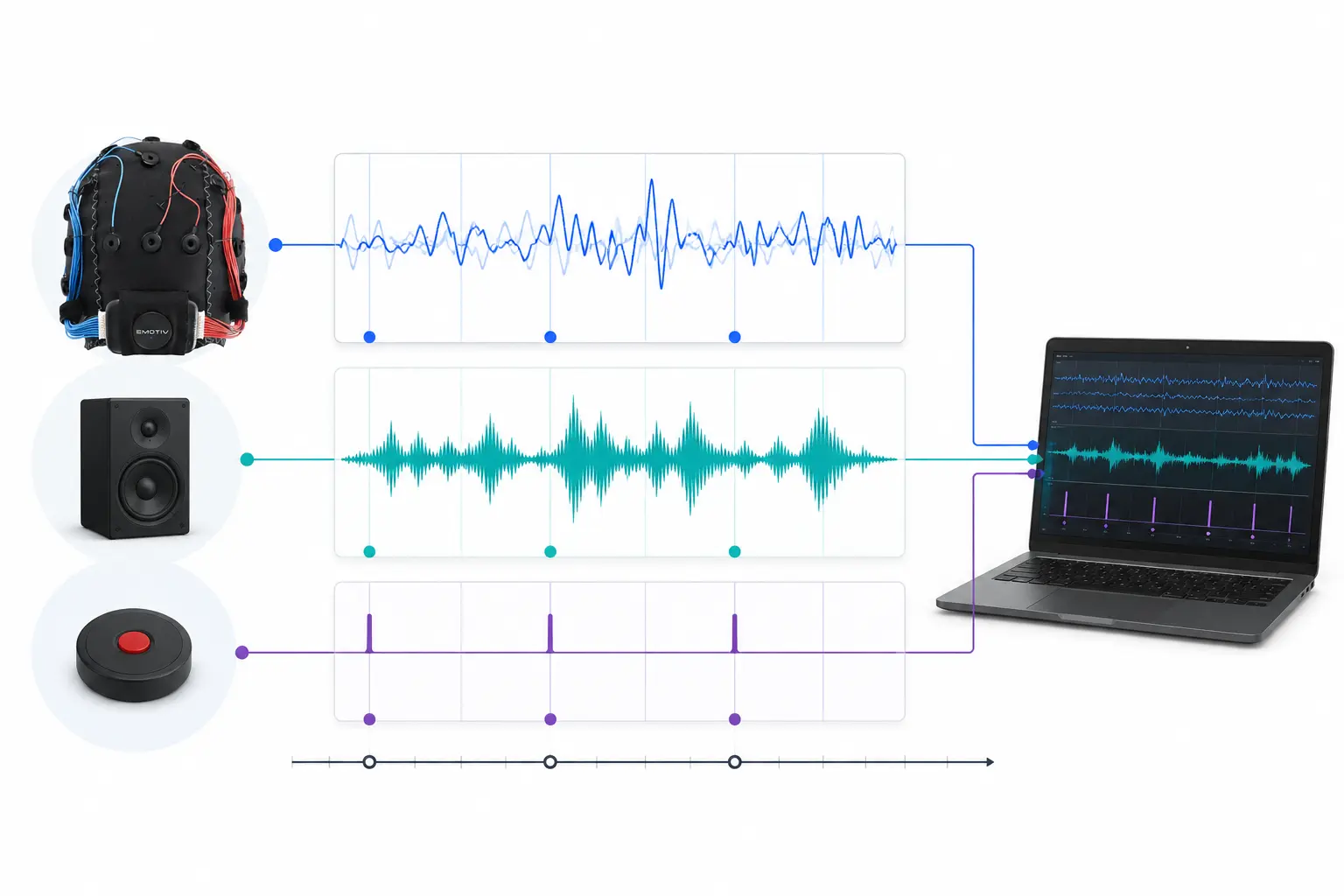
ایک محقق دو لوگوں کے درمیان جسمانی ہم آہنگی میں دلچسپی لے سکتا ہے جو ایک ہی موسیقی سن رہے ہوں۔ LSL ہمیں دو الگ الگ EEG ہیڈسیٹس سے ڈیٹا اکٹھا کرنے میں مدد کر سکتا ہے جو آواز کی پیشکش کے ساتھ بھی ہم آہنگ ہوتا ہے۔
LSL کے دیگر استعمالات کی چند مثالیں:
تجربے سے جاری EEG ڈیٹا میں ایونٹ مارکرز شامل کرنا
اکیلی شریک کے لیے متعدد ذرائع (مثلاً دل کی دھڑکن، EMG، EEG) سے حاصل شدہ ڈیٹا کو وقت کے مطابق ترتیب دینا
متعدد شرکاء (مثلاً EEG Hyperscanning اسٹڈیز) کے ڈیٹا کو وقت کے مطابق ترتیب دینا
1.2 LSL کیسے کام کرتا ہے؟
لیب اسٹریمنگ لیئر متعدد آلات کے درمیان ٹائم-سیریز ڈیٹا کے ریئل ٹائم تبادلے کے لیے ایک پروٹوکول ہے۔ LSL کو پائتھون (Python)، میٹلیب (MATLAB)، ++C، جاوا (Java) اور دیگر پروگرامنگ زبانوں کے لیے اوپن سورس لائبریریوں کا استعمال کرتے ہوئے نافذ کیا جا سکتا ہے۔
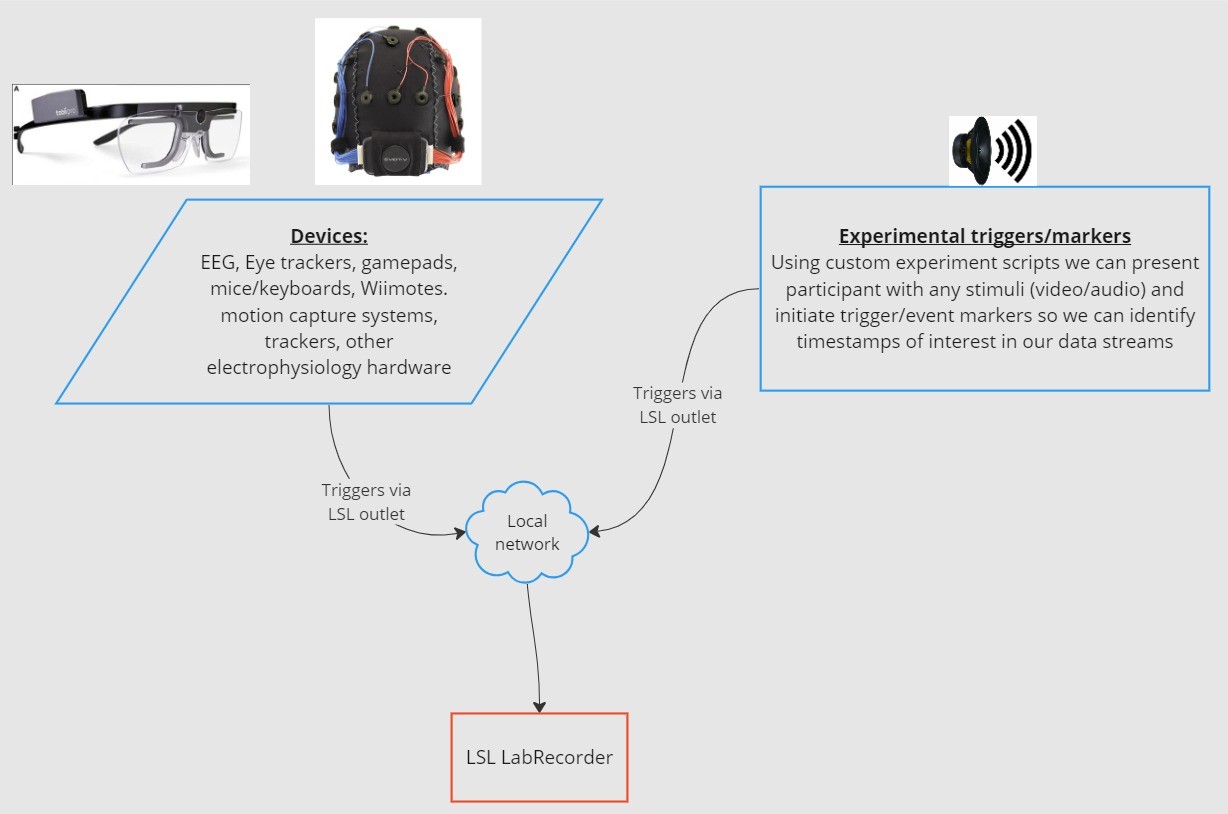
بنیادی فعالیت LSL ڈیٹا اسٹریمس کے گرد گھومتی ہے:
1. ایک ایکویزیشن آلہ/سافٹ ویئر ڈیٹا اکٹھا کرتا ہے اور ڈیٹا اسٹریم بناتا ہے - جسمانی ڈیٹا کو EEG ریکارڈنگ آلات، آئی ٹریکرز، موشن کیپچر سسٹمز، ہارٹ ریٹ مانیٹرز وغیرہ سے LSL پر اسٹریم کیا جا سکتا ہے، بشمول میٹا ڈیٹا (سیمپلنگ ریٹ، ڈیٹا کی قسم، چینل کی معلومات، وغیرہ) - تجربات سے ایونٹ مارکرز (مثال کے طور پر PsychoPy کا استعمال کرتے ہوئے) کو بھی LSL کا استعمال کرتے ہوئے ڈیٹا اسٹریم کے طور پر بھیجا جا سکتا ہے۔
2. ڈیٹا اسٹریم کو نیٹ ورک پر پبلش کیا جاتا ہے - اس طرح LSL کا استعمال کرتے ہوئے ڈیٹا بھیجا جاتا ہے؛ ڈیٹا اسٹریم کو نیٹ ورک پر “براڈکاسٹ” کیا جاتا ہے - پبلش شدہ اسٹریمس نیٹ ورک پر دستیاب ہوتی ہیں اور اسی نیٹ ورک پر موجود دیگر LSL معاون آلات کے ذریعے تلاش کی جا سکتی ہیں - LSL ہر ڈیٹا چنک یا سیمپل کو ایک مشترکہ کلاک (نیٹ ورک ٹائم پروٹوکول کے تحت) کی بنیاد پر ٹائم اسٹیمپ تفویض کرتا ہے۔ - اسٹریم کو ایک “آؤٹ لیٹ” کے ذریعے سیمپل بہ سیمپل (یا چنک بہ چنک) پش کیا جاتا ہے۔
3. کلیکشن ڈیوائس (یا ڈیوائسز) ڈیٹا اسٹریمس کو “سبسکرائب” کرتی ہیں - اس طرح LSL کا استعمال کرتے ہوئے ڈیٹا وصول کیا جاتا ہے - اسی نیٹ ورک پر موجود کلیکشن آلات “ان لیٹس” (inlets) کے ذریعے پبلش شدہ ڈیٹا اسٹریمس حاصل کرتے ہیں۔ - ہر ان لیٹ صرف ایک آؤٹ لیٹ سے اسٹریم سیمپلز اور میٹا ڈیٹا وصول کرتا ہے
4. ڈیٹا محفوظ کریں - ڈیٹا اسٹریم کو سبسکرائب کرنے پر، آپ اسے اپنی پسندیدہ پروگرامنگ زبان میں ایک متغیر (variable) میں محفوظ کر سکتے ہیں، یا اسے xdf. جیسے معیاری فارمیٹ میں محفوظ کرنے کے لیے LSL کے فراہم کردہ سافٹ ویئر LabRecorder کا استعمال کر سکتے ہیں۔
2.0 ٹیوٹوریل کا جائزہ
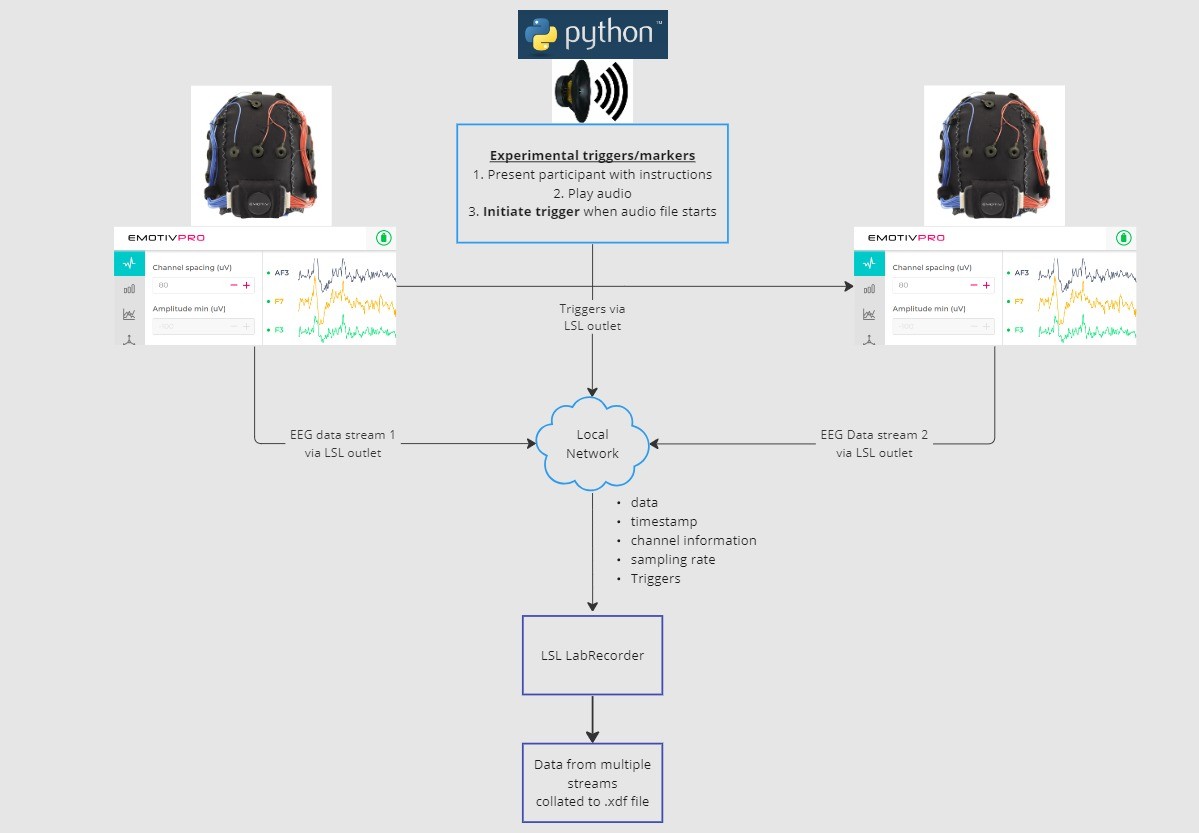
اس ٹیوٹوریل میں، ہم ایک مثالی پروٹو ٹائپ تجربہ لیں گے اور پائتھون میں LSL کا استعمال کرتے ہوئے اسے نافذ کرنے کے لیے ضروری مراحل اور کوڈ کے ذریعے آپ کی رہنمائی کریں گے۔ ہم پائتھون کا استعمال کرتے ہوئے ایک آواز چلائیں گے جب کہ دو افراد سے EEG ڈیٹا جمع کریں گے جنہوں نے Emotiv ہیڈسیٹ پہنے ہوئے ہیں۔ ہم EEG ڈیٹا جمع کرنے کے لیے دو کمپیوٹرز کا استعمال کریں گے جن میں سے ہر ایک پر EmotivPRO چل رہا ہوگا، اور ہر اسٹریم کو ایک الگ LSL آؤٹ لیٹ کے ذریعے براڈکاسٹ کریں گے۔ ہم ایک پائتھون لائبریری کا استعمال کرتے ہوئے ایک آڈیو فائل چلائیں گے اور ساتھ ہی ہر بار جب فائل شروع ہوگی تو ایک ٹرگر بھیجیں گے۔
مراحل:
1. EmotivPRO کا استعمال کرتے ہوئے LSL آؤٹ لیٹس کے ذریعے ڈیٹا اسٹریم کریں جس میں EEG ڈیٹا (اور/یا موشن، کانٹیکٹ کوالٹی، سگنل کوالٹی وغیرہ) شامل ہو۔ 2. پائتھون اسکرپٹ کا استعمال کرتے ہوئے ایک آڈیو ٹریک چلائیں، اور ساتھ ہی دوسرے LSL کے ذریعے ایک ٹرگر بھیجیں، اور LabRecorder کا استعمال کرتے ہوئے LSL ان لیٹ کے ذریعے ان تینوں ڈیٹا اسٹریمس کو کیپچر اور محفوظ کریں۔
2.1 مرحلہ 1 - سیٹ اپ اور انسٹالیشن
ڈیٹا جمع کرنے کے لیے آپ کو معاون ڈیٹا کے حصول کے آلات کی ضرورت ہوگی
• Emotiv کے تمام برین ویئر آلات EmotivPRO سافٹ ویئر کے ذریعے LSL سے منسلک ہوتے ہیںاپنے آلات پر EmotivPRO انسٹال کریں۔ LSL استعمال کرنے کے لیے آپ کو ایک درست EmotivPRO لائسنس کی ضرورت ہوگی۔
درج ذیل کمانڈ کے ساتھ پائتھون LSL لائبریری انسٹال کریں:
pip install pylslLabRecorder سافٹ ویئر ڈاؤن لوڈ کریں۔ یہ ایک سادہ، مفت ایپ ہے جسے کمانڈ لائن سے یا اسٹینڈ اکیلے ڈاؤن لوڈ کے ذریعے چلایا جا سکتا ہے
ہمارے تجربے کے لیے : پائتھون کا استعمال کرتے ہوئے آڈیو چلانے کے لیے ضروری پیکیجز انسٹال کریں
pip install sounddevice soundfile
2.2 مرحلہ 3 - EmotivPRO سے LSL اسٹریم کے ذریعے ڈیٹا بھیجیں
ایپ کے اوپری دائیں کونے میں “…” تلاش کریں، اور Settings پر جائیں
‘Lab Streaming Layer’ سیکشن اور ‘Outlet’ سب-سیکشن تلاش کریں
ان تمام ڈیٹا کی اقسام کو منتخب کریں جنہیں آپ براڈکاسٹ کرنا چاہتے ہیں
ڈیٹا فارمیٹ منتخب کریں (32-bit float یا 64-bit double)
منتخب کریں کہ آیا ڈیٹا کو سیمپل بہ سیمپل بھیجنا ہے یا سیمپلز کے چنکس (ٹکڑوں) میں
LSL ڈیٹا اسٹریم براڈکاسٹ کرنے کے لیے ‘Start’ پر کلک کریں
2.3 مرحلہ 4 - آڈیو چلانے اور ٹرگر بھیجنے کے لیے پائتھون اسکرپٹ کا استعمال کریں
درج ذیل کوڈ بلاک کو کاپی کریں اور اسے پائتھون فائل میں پیسٹ کر کے اپنے کمپیوٹر پر محفوظ کریں۔
ایک آڈیو فائل تلاش کریں (مثالی طور پر ایک .wav فائل) جسے آپ چلانا چاہتے ہیں، اور متغیر
audio_filepathکو اپنے کمپیوٹر پر آڈیو فائل کے پاتھ سے تبدیل کر کے اسکرپٹ میں ترمیم کریںکمانڈ لائن کے ساتھ بات چیت کرنے کے لیے کمانڈ پرامپٹ کھولیں اور اس فولڈر پر جائیں جہاں آپ کی پائتھون فائل محفوظ ہے
درج کریں:
python3 filename.py
• آپ کی پائتھون انسٹالیشن پر منحصر ہے، آپpython3کے بجائےpythonاستعمال کر سکتے ہیں
نوٹ:/path/to/audio.wavکو اس آڈیو فائل کے مقام سے تبدیل کریں جسے آپ اپنے تجربے کے دوران چلانا چاہتے ہیں۔
""" LSL Example: Play audio and send a trigger marker <p>This script creates an LSL marker stream, waits for the user to<br>press ENTER, then plays an audio file and sends a marker that<br>can be synchronized with EEG data collected through LabRecorder.<br>"""</p> <p>import sounddevice as sd<br>import soundfile as sf<br>from pylsl import StreamInfo, StreamOutlet</p> <p>def wait_for_keypress():<br>print("Press ENTER to start audio playback and send an LSL marker.")<br>while True:<br>if input() == "":<br>break</p> <p>def play_audio_and_send_marker(audio_file, outlet):<br>data, fs = sf.read(audio_file)</p> <pre><code>print("Playing audio and sending LSL marker...") marker_val = [1] outlet.push_sample(marker_val) sd.play(data, fs) sd.wait() print("Audio playback finished.") </code></pre> <p>if <strong>name</strong> == "<strong>main</strong>":</p> <pre><code>info = StreamInfo( name="AudioMarkers", type="Markers", channel_count=1, nominal_srate=0, channel_format="int32", source_id="uniqueMarkerID12345" ) outlet = StreamOutlet(info) while True: wait_for_keypress() audio_filepath = "/path/to/audio.wav" play_audio_and_send_marker( audio_filepath, outlet )</code></pre><h2 dir="auto">2.4 STEP 5 - Use LabRecorder to view and save all LSL streams</h2><ol dir="auto"><li data-preset-tag="p"><p>Open LabRecorder</p></li><li data-preset-tag="p"><p>Press <code>Update</code>. The available LSL streams should be visible in the stream list<br>• You should be able to see streams from both EmotivPROs (usually called “Emotiv-<br>DataStream”) and the marker stream (called “AudioMarkers”)</p></li><li data-preset-tag="p"><p>Click <code>Browse</code> to select a location to store data (and set other parameters)</p></li><li data-preset-tag="p"><p>Select all streams and press <code>Record</code> to start recording</p></li></ol><h2 dir="auto">3.0 Working with the data</h2><p dir="auto">LabRecorder outputs an XDF file (Extensible Data Format) that contains data from all the streams. XDF files are structured into, streams, each with a different header that describes what it contains (device name, data type, sampling rate, channels, and more). You can use the below codeblock to open your XDF file and display some basic information.</p><p dir="auto"><strong>Note: Replace </strong><code><strong>/path/to/your/file.xdf</strong></code><strong> with the filepath for your LabRecorder XDF output file.</strong></p><pre data-language="JSX"><code>import pyxdf </code></pre> <p>import mne<br>import matplotlib.pyplot as plt<br>import numpy as np</p> <h1>Give the path to your LSL output file here.</h1> <p>data_path = "/path/to/your/file.xdf"</p> <h1>Load the XDF file.</h1> <p>streams, fileheader = pyxdf.load_xdf(data_path)</p> <p>print("XDF File Header:", fileheader)<br>print("Number of streams found:", len(streams))</p> <p>for i, stream in enumerate(streams):<br>print("\nStream", i + 1)<br>print("Stream Name:", stream["info"]["name"][0])<br>print("Stream Type:", stream["info"]["type"][0])<br>print("Number of Channels:", stream["info"]["channel_count"][0])</p> <pre><code>sfreq = float(stream["info"]["nominal_srate"][0]) print("Sampling Rate:", sfreq) print("Number of Samples:", len(stream["time_series"])) print("First 5 data points:", stream["time_series"][:5]) channel_names = [ chan["label"][0] for chan in stream["info"]["desc"][0]["channels"][0]["channel"] ] print("Channel Names:", channel_names) channel_types = "eeg"</code></pre><h3 dir="auto"><br></h3><h2 dir="auto">4.0 Additional Resources</h2><h4 dir="auto">Official Documentation</h4><ol dir="auto"><li data-preset-tag="p"><p>Check out the <a href="1. Check out the online documentation, including the official README file on GitHub 2. Additional resources: • Code to run LSL using Emotiv’s devices, with example scripts • Useful LSL demo on YouTube • SCCN LSL GitHub repository for all associated libraries • LSL GitHub repository for a collection a submodules and apps 3. HyPyP analysis pipeline for Hyperscanning studies" target="_blank">online documentation</a>, including the <a href="https://github.com/sccn/labstreaminglayer/" target="_blank">official README file on GitHub</a></p></li><li data-preset-tag="p"><p>Additional resources:<br>• <a href="https://github.com/Emotiv/labstreaminglayer" target="_blank">Code</a> to run LSL using Emotiv’s devices, with example scripts<br>• Useful <a href="https://www.youtube.com/watch?v=Y1at7yrcFW0&list=PLVnr33MP5RMRhGwY36zHHDOmAaYTB138D" target="_blank">LSL demo on YouTube</a><br>• <a href="https://github.com/sccn/labstreaminglayer" target="_blank">SCCN LSL GitHub repository</a> for all associated libraries<br>• <a href="https://github.com/labstreaminglayer" target="_blank">LSL GitHub repository</a> for a collection a submodules and apps</p></li><li data-preset-tag="p"><p><a href="https://academic.oup.com/scan/article/16/1-2/72/5919711?login=false" target="_blank">HyPyP analysis pipeline</a> for Hyperscanning studies</p></li></ol> </code></pre
""" LSL Example: Play audio and send a trigger marker <p>This script creates an LSL marker stream, waits for the user to<br>press ENTER, then plays an audio file and sends a marker that<br>can be synchronized with EEG data collected through LabRecorder.<br>"""</p> <p>import sounddevice as sd<br>import soundfile as sf<br>from pylsl import StreamInfo, StreamOutlet</p> <p>def wait_for_keypress():<br>print("Press ENTER to start audio playback and send an LSL marker.")<br>while True:<br>if input() == "":<br>break</p> <p>def play_audio_and_send_marker(audio_file, outlet):<br>data, fs = sf.read(audio_file)</p> <pre><code>print("Playing audio and sending LSL marker...") marker_val = [1] outlet.push_sample(marker_val) sd.play(data, fs) sd.wait() print("Audio playback finished.") </code></pre> <p>if <strong>name</strong> == "<strong>main</strong>":</p> <pre><code>info = StreamInfo( name="AudioMarkers", type="Markers", channel_count=1, nominal_srate=0, channel_format="int32", source_id="uniqueMarkerID12345" ) outlet = StreamOutlet(info) while True: wait_for_keypress() audio_filepath = "/path/to/audio.wav" play_audio_and_send_marker( audio_filepath, outlet )</code></pre><h2 dir="auto">2.4 STEP 5 - Use LabRecorder to view and save all LSL streams</h2><ol dir="auto"><li data-preset-tag="p"><p>Open LabRecorder</p></li><li data-preset-tag="p"><p>Press <code>Update</code>. The available LSL streams should be visible in the stream list<br>• You should be able to see streams from both EmotivPROs (usually called “Emotiv-<br>DataStream”) and the marker stream (called “AudioMarkers”)</p></li><li data-preset-tag="p"><p>Click <code>Browse</code> to select a location to store data (and set other parameters)</p></li><li data-preset-tag="p"><p>Select all streams and press <code>Record</code> to start recording</p></li></ol><h2 dir="auto">3.0 Working with the data</h2><p dir="auto">LabRecorder outputs an XDF file (Extensible Data Format) that contains data from all the streams. XDF files are structured into, streams, each with a different header that describes what it contains (device name, data type, sampling rate, channels, and more). You can use the below codeblock to open your XDF file and display some basic information.</p><p dir="auto"><strong>Note: Replace </strong><code><strong>/path/to/your/file.xdf</strong></code><strong> with the filepath for your LabRecorder XDF output file.</strong></p><pre data-language="JSX"><code>import pyxdf </code></pre> <p>import mne<br>import matplotlib.pyplot as plt<br>import numpy as np</p> <h1>Give the path to your LSL output file here.</h1> <p>data_path = "/path/to/your/file.xdf"</p> <h1>Load the XDF file.</h1> <p>streams, fileheader = pyxdf.load_xdf(data_path)</p> <p>print("XDF File Header:", fileheader)<br>print("Number of streams found:", len(streams))</p> <p>for i, stream in enumerate(streams):<br>print("\nStream", i + 1)<br>print("Stream Name:", stream["info"]["name"][0])<br>print("Stream Type:", stream["info"]["type"][0])<br>print("Number of Channels:", stream["info"]["channel_count"][0])</p> <pre><code>sfreq = float(stream["info"]["nominal_srate"][0]) print("Sampling Rate:", sfreq) print("Number of Samples:", len(stream["time_series"])) print("First 5 data points:", stream["time_series"][:5]) channel_names = [ chan["label"][0] for chan in stream["info"]["desc"][0]["channels"][0]["channel"] ] print("Channel Names:", channel_names) channel_types = "eeg"</code></pre><h3 dir="auto"><br></h3><h2 dir="auto">4.0 Additional Resources</h2><h4 dir="auto">Official Documentation</h4><ol dir="auto"><li data-preset-tag="p"><p>Check out the <a href="1. Check out the online documentation, including the official README file on GitHub 2. Additional resources: • Code to run LSL using Emotiv’s devices, with example scripts • Useful LSL demo on YouTube • SCCN LSL GitHub repository for all associated libraries • LSL GitHub repository for a collection a submodules and apps 3. HyPyP analysis pipeline for Hyperscanning studies" target="_blank">online documentation</a>, including the <a href="https://github.com/sccn/labstreaminglayer/" target="_blank">official README file on GitHub</a></p></li><li data-preset-tag="p"><p>Additional resources:<br>• <a href="https://github.com/Emotiv/labstreaminglayer" target="_blank">Code</a> to run LSL using Emotiv’s devices, with example scripts<br>• Useful <a href="https://www.youtube.com/watch?v=Y1at7yrcFW0&list=PLVnr33MP5RMRhGwY36zHHDOmAaYTB138D" target="_blank">LSL demo on YouTube</a><br>• <a href="https://github.com/sccn/labstreaminglayer" target="_blank">SCCN LSL GitHub repository</a> for all associated libraries<br>• <a href="https://github.com/labstreaminglayer" target="_blank">LSL GitHub repository</a> for a collection a submodules and apps</p></li><li data-preset-tag="p"><p><a href="https://academic.oup.com/scan/article/16/1-2/72/5919711?login=false" target="_blank">HyPyP analysis pipeline</a> for Hyperscanning studies</p></li></ol> </code></pre
""" LSL Example: Play audio and send a trigger marker <p>This script creates an LSL marker stream, waits for the user to<br>press ENTER, then plays an audio file and sends a marker that<br>can be synchronized with EEG data collected through LabRecorder.<br>"""</p> <p>import sounddevice as sd<br>import soundfile as sf<br>from pylsl import StreamInfo, StreamOutlet</p> <p>def wait_for_keypress():<br>print("Press ENTER to start audio playback and send an LSL marker.")<br>while True:<br>if input() == "":<br>break</p> <p>def play_audio_and_send_marker(audio_file, outlet):<br>data, fs = sf.read(audio_file)</p> <pre><code>print("Playing audio and sending LSL marker...") marker_val = [1] outlet.push_sample(marker_val) sd.play(data, fs) sd.wait() print("Audio playback finished.") </code></pre> <p>if <strong>name</strong> == "<strong>main</strong>":</p> <pre><code>info = StreamInfo( name="AudioMarkers", type="Markers", channel_count=1, nominal_srate=0, channel_format="int32", source_id="uniqueMarkerID12345" ) outlet = StreamOutlet(info) while True: wait_for_keypress() audio_filepath = "/path/to/audio.wav" play_audio_and_send_marker( audio_filepath, outlet )</code></pre><h2 dir="auto">2.4 STEP 5 - Use LabRecorder to view and save all LSL streams</h2><ol dir="auto"><li data-preset-tag="p"><p>Open LabRecorder</p></li><li data-preset-tag="p"><p>Press <code>Update</code>. The available LSL streams should be visible in the stream list<br>• You should be able to see streams from both EmotivPROs (usually called “Emotiv-<br>DataStream”) and the marker stream (called “AudioMarkers”)</p></li><li data-preset-tag="p"><p>Click <code>Browse</code> to select a location to store data (and set other parameters)</p></li><li data-preset-tag="p"><p>Select all streams and press <code>Record</code> to start recording</p></li></ol><h2 dir="auto">3.0 Working with the data</h2><p dir="auto">LabRecorder outputs an XDF file (Extensible Data Format) that contains data from all the streams. XDF files are structured into, streams, each with a different header that describes what it contains (device name, data type, sampling rate, channels, and more). You can use the below codeblock to open your XDF file and display some basic information.</p><p dir="auto"><strong>Note: Replace </strong><code><strong>/path/to/your/file.xdf</strong></code><strong> with the filepath for your LabRecorder XDF output file.</strong></p><pre data-language="JSX"><code>import pyxdf </code></pre> <p>import mne<br>import matplotlib.pyplot as plt<br>import numpy as np</p> <h1>Give the path to your LSL output file here.</h1> <p>data_path = "/path/to/your/file.xdf"</p> <h1>Load the XDF file.</h1> <p>streams, fileheader = pyxdf.load_xdf(data_path)</p> <p>print("XDF File Header:", fileheader)<br>print("Number of streams found:", len(streams))</p> <p>for i, stream in enumerate(streams):<br>print("\nStream", i + 1)<br>print("Stream Name:", stream["info"]["name"][0])<br>print("Stream Type:", stream["info"]["type"][0])<br>print("Number of Channels:", stream["info"]["channel_count"][0])</p> <pre><code>sfreq = float(stream["info"]["nominal_srate"][0]) print("Sampling Rate:", sfreq) print("Number of Samples:", len(stream["time_series"])) print("First 5 data points:", stream["time_series"][:5]) channel_names = [ chan["label"][0] for chan in stream["info"]["desc"][0]["channels"][0]["channel"] ] print("Channel Names:", channel_names) channel_types = "eeg"</code></pre><h3 dir="auto"><br></h3><h2 dir="auto">4.0 Additional Resources</h2><h4 dir="auto">Official Documentation</h4><ol dir="auto"><li data-preset-tag="p"><p>Check out the <a href="1. Check out the online documentation, including the official README file on GitHub 2. Additional resources: • Code to run LSL using Emotiv’s devices, with example scripts • Useful LSL demo on YouTube • SCCN LSL GitHub repository for all associated libraries • LSL GitHub repository for a collection a submodules and apps 3. HyPyP analysis pipeline for Hyperscanning studies" target="_blank">online documentation</a>, including the <a href="https://github.com/sccn/labstreaminglayer/" target="_blank">official README file on GitHub</a></p></li><li data-preset-tag="p"><p>Additional resources:<br>• <a href="https://github.com/Emotiv/labstreaminglayer" target="_blank">Code</a> to run LSL using Emotiv’s devices, with example scripts<br>• Useful <a href="https://www.youtube.com/watch?v=Y1at7yrcFW0&list=PLVnr33MP5RMRhGwY36zHHDOmAaYTB138D" target="_blank">LSL demo on YouTube</a><br>• <a href="https://github.com/sccn/labstreaminglayer" target="_blank">SCCN LSL GitHub repository</a> for all associated libraries<br>• <a href="https://github.com/labstreaminglayer" target="_blank">LSL GitHub repository</a> for a collection a submodules and apps</p></li><li data-preset-tag="p"><p><a href="https://academic.oup.com/scan/article/16/1-2/72/5919711?login=false" target="_blank">HyPyP analysis pipeline</a> for Hyperscanning studies</p></li></ol> </code></pre
خوش آمدید! اس ٹیوٹوریل میں ہم سیکھیں گے کہ متعدد آلات سے Emotiv EEG ڈیٹا کو اکٹھا اور ہم آہنگ کرنے کے لیے پائتھون (Python) میں لیب اسٹریمنگ لیئر (LSL) کا استعمال کیسے کیا جائے۔ اس کے لیے پائتھون پروگرامنگ زبان کا بنیادی عملی علم ہونا ضروری ہے۔
آپ کیا سیکھیں گے
لیب اسٹریمنگ لیئر (LSL) کیا ہے اور محققین اس کا استعمال کیوں کرتے ہیں
متعدد Emotiv EEG آلات سے ہم آہنگ ڈیٹا کیسے اکٹھا کیا جائے
اکٹھے کیے گئے ڈیٹا کو امپورٹ کرنے اور اس کا معائنہ کرنے کا طریقہ
1.1 LSL کیا ہے اور یہ کس لیے موزوں ہے؟
لیب اسٹریمنگ لیئر (LSL) ایک اوپن سورس ٹول بکس ہے جسے مختلف سینسر ہارڈ ویئر سے عصبی، جسمانی، اور رویے کے ڈیٹا اسٹریمس کو بھیجنے، وصول کرنے اور ہم آہنگ کرنے کے لیے استعمال کیا جا سکتا ہے۔ تیزی سے قابل، درست اور موبائل برین اور باڈی سینسنگ ہارڈ ویئر ڈیوائسز (جیسے Emotiv EEG سسٹمز) نیورو سائنس کو لیب سے باہر حقیقی وقت (real-time) کے ڈیٹا کی دنیا میں لا رہے ہیں۔ جہاں کبھی EEG اور MEG جیسی دماغی پیمائشیں ریسرچ لیبز تک محدود تھیں، وہیں موبائل آلات ہمیں زیادہ قدرتی ماحول میں اور ایک ہی وقت میں متعدد افراد سے ڈیٹا اکٹھا کرنے کی سہولت دیتے ہیں۔
ایک محقق دو لوگوں کے درمیان جسمانی ہم آہنگی میں دلچسپی لے سکتا ہے جو ایک ہی موسیقی سن رہے ہوں۔ LSL ہمیں دو الگ الگ EEG ہیڈسیٹس سے ڈیٹا اکٹھا کرنے میں مدد کر سکتا ہے جو آواز کی پیشکش کے ساتھ بھی ہم آہنگ ہوتا ہے۔
LSL کے دیگر استعمالات کی چند مثالیں:
تجربے سے جاری EEG ڈیٹا میں ایونٹ مارکرز شامل کرنا
اکیلی شریک کے لیے متعدد ذرائع (مثلاً دل کی دھڑکن، EMG، EEG) سے حاصل شدہ ڈیٹا کو وقت کے مطابق ترتیب دینا
متعدد شرکاء (مثلاً EEG Hyperscanning اسٹڈیز) کے ڈیٹا کو وقت کے مطابق ترتیب دینا
1.2 LSL کیسے کام کرتا ہے؟
لیب اسٹریمنگ لیئر متعدد آلات کے درمیان ٹائم-سیریز ڈیٹا کے ریئل ٹائم تبادلے کے لیے ایک پروٹوکول ہے۔ LSL کو پائتھون (Python)، میٹلیب (MATLAB)، ++C، جاوا (Java) اور دیگر پروگرامنگ زبانوں کے لیے اوپن سورس لائبریریوں کا استعمال کرتے ہوئے نافذ کیا جا سکتا ہے۔
بنیادی فعالیت LSL ڈیٹا اسٹریمس کے گرد گھومتی ہے:
1. ایک ایکویزیشن آلہ/سافٹ ویئر ڈیٹا اکٹھا کرتا ہے اور ڈیٹا اسٹریم بناتا ہے - جسمانی ڈیٹا کو EEG ریکارڈنگ آلات، آئی ٹریکرز، موشن کیپچر سسٹمز، ہارٹ ریٹ مانیٹرز وغیرہ سے LSL پر اسٹریم کیا جا سکتا ہے، بشمول میٹا ڈیٹا (سیمپلنگ ریٹ، ڈیٹا کی قسم، چینل کی معلومات، وغیرہ) - تجربات سے ایونٹ مارکرز (مثال کے طور پر PsychoPy کا استعمال کرتے ہوئے) کو بھی LSL کا استعمال کرتے ہوئے ڈیٹا اسٹریم کے طور پر بھیجا جا سکتا ہے۔
2. ڈیٹا اسٹریم کو نیٹ ورک پر پبلش کیا جاتا ہے - اس طرح LSL کا استعمال کرتے ہوئے ڈیٹا بھیجا جاتا ہے؛ ڈیٹا اسٹریم کو نیٹ ورک پر “براڈکاسٹ” کیا جاتا ہے - پبلش شدہ اسٹریمس نیٹ ورک پر دستیاب ہوتی ہیں اور اسی نیٹ ورک پر موجود دیگر LSL معاون آلات کے ذریعے تلاش کی جا سکتی ہیں - LSL ہر ڈیٹا چنک یا سیمپل کو ایک مشترکہ کلاک (نیٹ ورک ٹائم پروٹوکول کے تحت) کی بنیاد پر ٹائم اسٹیمپ تفویض کرتا ہے۔ - اسٹریم کو ایک “آؤٹ لیٹ” کے ذریعے سیمپل بہ سیمپل (یا چنک بہ چنک) پش کیا جاتا ہے۔
3. کلیکشن ڈیوائس (یا ڈیوائسز) ڈیٹا اسٹریمس کو “سبسکرائب” کرتی ہیں - اس طرح LSL کا استعمال کرتے ہوئے ڈیٹا وصول کیا جاتا ہے - اسی نیٹ ورک پر موجود کلیکشن آلات “ان لیٹس” (inlets) کے ذریعے پبلش شدہ ڈیٹا اسٹریمس حاصل کرتے ہیں۔ - ہر ان لیٹ صرف ایک آؤٹ لیٹ سے اسٹریم سیمپلز اور میٹا ڈیٹا وصول کرتا ہے
4. ڈیٹا محفوظ کریں - ڈیٹا اسٹریم کو سبسکرائب کرنے پر، آپ اسے اپنی پسندیدہ پروگرامنگ زبان میں ایک متغیر (variable) میں محفوظ کر سکتے ہیں، یا اسے xdf. جیسے معیاری فارمیٹ میں محفوظ کرنے کے لیے LSL کے فراہم کردہ سافٹ ویئر LabRecorder کا استعمال کر سکتے ہیں۔
2.0 ٹیوٹوریل کا جائزہ
اس ٹیوٹوریل میں، ہم ایک مثالی پروٹو ٹائپ تجربہ لیں گے اور پائتھون میں LSL کا استعمال کرتے ہوئے اسے نافذ کرنے کے لیے ضروری مراحل اور کوڈ کے ذریعے آپ کی رہنمائی کریں گے۔ ہم پائتھون کا استعمال کرتے ہوئے ایک آواز چلائیں گے جب کہ دو افراد سے EEG ڈیٹا جمع کریں گے جنہوں نے Emotiv ہیڈسیٹ پہنے ہوئے ہیں۔ ہم EEG ڈیٹا جمع کرنے کے لیے دو کمپیوٹرز کا استعمال کریں گے جن میں سے ہر ایک پر EmotivPRO چل رہا ہوگا، اور ہر اسٹریم کو ایک الگ LSL آؤٹ لیٹ کے ذریعے براڈکاسٹ کریں گے۔ ہم ایک پائتھون لائبریری کا استعمال کرتے ہوئے ایک آڈیو فائل چلائیں گے اور ساتھ ہی ہر بار جب فائل شروع ہوگی تو ایک ٹرگر بھیجیں گے۔
مراحل:
1. EmotivPRO کا استعمال کرتے ہوئے LSL آؤٹ لیٹس کے ذریعے ڈیٹا اسٹریم کریں جس میں EEG ڈیٹا (اور/یا موشن، کانٹیکٹ کوالٹی، سگنل کوالٹی وغیرہ) شامل ہو۔ 2. پائتھون اسکرپٹ کا استعمال کرتے ہوئے ایک آڈیو ٹریک چلائیں، اور ساتھ ہی دوسرے LSL کے ذریعے ایک ٹرگر بھیجیں، اور LabRecorder کا استعمال کرتے ہوئے LSL ان لیٹ کے ذریعے ان تینوں ڈیٹا اسٹریمس کو کیپچر اور محفوظ کریں۔
2.1 مرحلہ 1 - سیٹ اپ اور انسٹالیشن
ڈیٹا جمع کرنے کے لیے آپ کو معاون ڈیٹا کے حصول کے آلات کی ضرورت ہوگی
• Emotiv کے تمام برین ویئر آلات EmotivPRO سافٹ ویئر کے ذریعے LSL سے منسلک ہوتے ہیںاپنے آلات پر EmotivPRO انسٹال کریں۔ LSL استعمال کرنے کے لیے آپ کو ایک درست EmotivPRO لائسنس کی ضرورت ہوگی۔
درج ذیل کمانڈ کے ساتھ پائتھون LSL لائبریری انسٹال کریں:
pip install pylslLabRecorder سافٹ ویئر ڈاؤن لوڈ کریں۔ یہ ایک سادہ، مفت ایپ ہے جسے کمانڈ لائن سے یا اسٹینڈ اکیلے ڈاؤن لوڈ کے ذریعے چلایا جا سکتا ہے
ہمارے تجربے کے لیے : پائتھون کا استعمال کرتے ہوئے آڈیو چلانے کے لیے ضروری پیکیجز انسٹال کریں
pip install sounddevice soundfile
2.2 مرحلہ 3 - EmotivPRO سے LSL اسٹریم کے ذریعے ڈیٹا بھیجیں
ایپ کے اوپری دائیں کونے میں “…” تلاش کریں، اور Settings پر جائیں
‘Lab Streaming Layer’ سیکشن اور ‘Outlet’ سب-سیکشن تلاش کریں
ان تمام ڈیٹا کی اقسام کو منتخب کریں جنہیں آپ براڈکاسٹ کرنا چاہتے ہیں
ڈیٹا فارمیٹ منتخب کریں (32-bit float یا 64-bit double)
منتخب کریں کہ آیا ڈیٹا کو سیمپل بہ سیمپل بھیجنا ہے یا سیمپلز کے چنکس (ٹکڑوں) میں
LSL ڈیٹا اسٹریم براڈکاسٹ کرنے کے لیے ‘Start’ پر کلک کریں
2.3 مرحلہ 4 - آڈیو چلانے اور ٹرگر بھیجنے کے لیے پائتھون اسکرپٹ کا استعمال کریں
درج ذیل کوڈ بلاک کو کاپی کریں اور اسے پائتھون فائل میں پیسٹ کر کے اپنے کمپیوٹر پر محفوظ کریں۔
ایک آڈیو فائل تلاش کریں (مثالی طور پر ایک .wav فائل) جسے آپ چلانا چاہتے ہیں، اور متغیر
audio_filepathکو اپنے کمپیوٹر پر آڈیو فائل کے پاتھ سے تبدیل کر کے اسکرپٹ میں ترمیم کریںکمانڈ لائن کے ساتھ بات چیت کرنے کے لیے کمانڈ پرامپٹ کھولیں اور اس فولڈر پر جائیں جہاں آپ کی پائتھون فائل محفوظ ہے
درج کریں:
python3 filename.py
• آپ کی پائتھون انسٹالیشن پر منحصر ہے، آپpython3کے بجائےpythonاستعمال کر سکتے ہیں
نوٹ:/path/to/audio.wavکو اس آڈیو فائل کے مقام سے تبدیل کریں جسے آپ اپنے تجربے کے دوران چلانا چاہتے ہیں۔
""" LSL Example: Play audio and send a trigger marker <p>This script creates an LSL marker stream, waits for the user to<br>press ENTER, then plays an audio file and sends a marker that<br>can be synchronized with EEG data collected through LabRecorder.<br>"""</p> <p>import sounddevice as sd<br>import soundfile as sf<br>from pylsl import StreamInfo, StreamOutlet</p> <p>def wait_for_keypress():<br>print("Press ENTER to start audio playback and send an LSL marker.")<br>while True:<br>if input() == "":<br>break</p> <p>def play_audio_and_send_marker(audio_file, outlet):<br>data, fs = sf.read(audio_file)</p> <pre><code>print("Playing audio and sending LSL marker...") marker_val = [1] outlet.push_sample(marker_val) sd.play(data, fs) sd.wait() print("Audio playback finished.") </code></pre> <p>if <strong>name</strong> == "<strong>main</strong>":</p> <pre><code>info = StreamInfo( name="AudioMarkers", type="Markers", channel_count=1, nominal_srate=0, channel_format="int32", source_id="uniqueMarkerID12345" ) outlet = StreamOutlet(info) while True: wait_for_keypress() audio_filepath = "/path/to/audio.wav" play_audio_and_send_marker( audio_filepath, outlet )</code></pre><h2 dir="auto">2.4 STEP 5 - Use LabRecorder to view and save all LSL streams</h2><ol dir="auto"><li data-preset-tag="p"><p>Open LabRecorder</p></li><li data-preset-tag="p"><p>Press <code>Update</code>. The available LSL streams should be visible in the stream list<br>• You should be able to see streams from both EmotivPROs (usually called “Emotiv-<br>DataStream”) and the marker stream (called “AudioMarkers”)</p></li><li data-preset-tag="p"><p>Click <code>Browse</code> to select a location to store data (and set other parameters)</p></li><li data-preset-tag="p"><p>Select all streams and press <code>Record</code> to start recording</p></li></ol><h2 dir="auto">3.0 Working with the data</h2><p dir="auto">LabRecorder outputs an XDF file (Extensible Data Format) that contains data from all the streams. XDF files are structured into, streams, each with a different header that describes what it contains (device name, data type, sampling rate, channels, and more). You can use the below codeblock to open your XDF file and display some basic information.</p><p dir="auto"><strong>Note: Replace </strong><code><strong>/path/to/your/file.xdf</strong></code><strong> with the filepath for your LabRecorder XDF output file.</strong></p><pre data-language="JSX"><code>import pyxdf </code></pre> <p>import mne<br>import matplotlib.pyplot as plt<br>import numpy as np</p> <h1>Give the path to your LSL output file here.</h1> <p>data_path = "/path/to/your/file.xdf"</p> <h1>Load the XDF file.</h1> <p>streams, fileheader = pyxdf.load_xdf(data_path)</p> <p>print("XDF File Header:", fileheader)<br>print("Number of streams found:", len(streams))</p> <p>for i, stream in enumerate(streams):<br>print("\nStream", i + 1)<br>print("Stream Name:", stream["info"]["name"][0])<br>print("Stream Type:", stream["info"]["type"][0])<br>print("Number of Channels:", stream["info"]["channel_count"][0])</p> <pre><code>sfreq = float(stream["info"]["nominal_srate"][0]) print("Sampling Rate:", sfreq) print("Number of Samples:", len(stream["time_series"])) print("First 5 data points:", stream["time_series"][:5]) channel_names = [ chan["label"][0] for chan in stream["info"]["desc"][0]["channels"][0]["channel"] ] print("Channel Names:", channel_names) channel_types = "eeg"</code></pre><h3 dir="auto"><br></h3><h2 dir="auto">4.0 Additional Resources</h2><h4 dir="auto">Official Documentation</h4><ol dir="auto"><li data-preset-tag="p"><p>Check out the <a href="1. Check out the online documentation, including the official README file on GitHub 2. Additional resources: • Code to run LSL using Emotiv’s devices, with example scripts • Useful LSL demo on YouTube • SCCN LSL GitHub repository for all associated libraries • LSL GitHub repository for a collection a submodules and apps 3. HyPyP analysis pipeline for Hyperscanning studies" target="_blank">online documentation</a>, including the <a href="https://github.com/sccn/labstreaminglayer/" target="_blank">official README file on GitHub</a></p></li><li data-preset-tag="p"><p>Additional resources:<br>• <a href="https://github.com/Emotiv/labstreaminglayer" target="_blank">Code</a> to run LSL using Emotiv’s devices, with example scripts<br>• Useful <a href="https://www.youtube.com/watch?v=Y1at7yrcFW0&list=PLVnr33MP5RMRhGwY36zHHDOmAaYTB138D" target="_blank">LSL demo on YouTube</a><br>• <a href="https://github.com/sccn/labstreaminglayer" target="_blank">SCCN LSL GitHub repository</a> for all associated libraries<br>• <a href="https://github.com/labstreaminglayer" target="_blank">LSL GitHub repository</a> for a collection a submodules and apps</p></li><li data-preset-tag="p"><p><a href="https://academic.oup.com/scan/article/16/1-2/72/5919711?login=false" target="_blank">HyPyP analysis pipeline</a> for Hyperscanning studies</p></li></ol> </code></pre
خوش آمدید! اس ٹیوٹوریل میں ہم سیکھیں گے کہ متعدد آلات سے Emotiv EEG ڈیٹا کو اکٹھا اور ہم آہنگ کرنے کے لیے پائتھون (Python) میں لیب اسٹریمنگ لیئر (LSL) کا استعمال کیسے کیا جائے۔ اس کے لیے پائتھون پروگرامنگ زبان کا بنیادی عملی علم ہونا ضروری ہے۔
آپ کیا سیکھیں گے
لیب اسٹریمنگ لیئر (LSL) کیا ہے اور محققین اس کا استعمال کیوں کرتے ہیں
متعدد Emotiv EEG آلات سے ہم آہنگ ڈیٹا کیسے اکٹھا کیا جائے
اکٹھے کیے گئے ڈیٹا کو امپورٹ کرنے اور اس کا معائنہ کرنے کا طریقہ
1.1 LSL کیا ہے اور یہ کس لیے موزوں ہے؟
لیب اسٹریمنگ لیئر (LSL) ایک اوپن سورس ٹول بکس ہے جسے مختلف سینسر ہارڈ ویئر سے عصبی، جسمانی، اور رویے کے ڈیٹا اسٹریمس کو بھیجنے، وصول کرنے اور ہم آہنگ کرنے کے لیے استعمال کیا جا سکتا ہے۔ تیزی سے قابل، درست اور موبائل برین اور باڈی سینسنگ ہارڈ ویئر ڈیوائسز (جیسے Emotiv EEG سسٹمز) نیورو سائنس کو لیب سے باہر حقیقی وقت (real-time) کے ڈیٹا کی دنیا میں لا رہے ہیں۔ جہاں کبھی EEG اور MEG جیسی دماغی پیمائشیں ریسرچ لیبز تک محدود تھیں، وہیں موبائل آلات ہمیں زیادہ قدرتی ماحول میں اور ایک ہی وقت میں متعدد افراد سے ڈیٹا اکٹھا کرنے کی سہولت دیتے ہیں۔
ایک محقق دو لوگوں کے درمیان جسمانی ہم آہنگی میں دلچسپی لے سکتا ہے جو ایک ہی موسیقی سن رہے ہوں۔ LSL ہمیں دو الگ الگ EEG ہیڈسیٹس سے ڈیٹا اکٹھا کرنے میں مدد کر سکتا ہے جو آواز کی پیشکش کے ساتھ بھی ہم آہنگ ہوتا ہے۔
LSL کے دیگر استعمالات کی چند مثالیں:
تجربے سے جاری EEG ڈیٹا میں ایونٹ مارکرز شامل کرنا
اکیلی شریک کے لیے متعدد ذرائع (مثلاً دل کی دھڑکن، EMG، EEG) سے حاصل شدہ ڈیٹا کو وقت کے مطابق ترتیب دینا
متعدد شرکاء (مثلاً EEG Hyperscanning اسٹڈیز) کے ڈیٹا کو وقت کے مطابق ترتیب دینا
1.2 LSL کیسے کام کرتا ہے؟
لیب اسٹریمنگ لیئر متعدد آلات کے درمیان ٹائم-سیریز ڈیٹا کے ریئل ٹائم تبادلے کے لیے ایک پروٹوکول ہے۔ LSL کو پائتھون (Python)، میٹلیب (MATLAB)، ++C، جاوا (Java) اور دیگر پروگرامنگ زبانوں کے لیے اوپن سورس لائبریریوں کا استعمال کرتے ہوئے نافذ کیا جا سکتا ہے۔
بنیادی فعالیت LSL ڈیٹا اسٹریمس کے گرد گھومتی ہے:
1. ایک ایکویزیشن آلہ/سافٹ ویئر ڈیٹا اکٹھا کرتا ہے اور ڈیٹا اسٹریم بناتا ہے - جسمانی ڈیٹا کو EEG ریکارڈنگ آلات، آئی ٹریکرز، موشن کیپچر سسٹمز، ہارٹ ریٹ مانیٹرز وغیرہ سے LSL پر اسٹریم کیا جا سکتا ہے، بشمول میٹا ڈیٹا (سیمپلنگ ریٹ، ڈیٹا کی قسم، چینل کی معلومات، وغیرہ) - تجربات سے ایونٹ مارکرز (مثال کے طور پر PsychoPy کا استعمال کرتے ہوئے) کو بھی LSL کا استعمال کرتے ہوئے ڈیٹا اسٹریم کے طور پر بھیجا جا سکتا ہے۔
2. ڈیٹا اسٹریم کو نیٹ ورک پر پبلش کیا جاتا ہے - اس طرح LSL کا استعمال کرتے ہوئے ڈیٹا بھیجا جاتا ہے؛ ڈیٹا اسٹریم کو نیٹ ورک پر “براڈکاسٹ” کیا جاتا ہے - پبلش شدہ اسٹریمس نیٹ ورک پر دستیاب ہوتی ہیں اور اسی نیٹ ورک پر موجود دیگر LSL معاون آلات کے ذریعے تلاش کی جا سکتی ہیں - LSL ہر ڈیٹا چنک یا سیمپل کو ایک مشترکہ کلاک (نیٹ ورک ٹائم پروٹوکول کے تحت) کی بنیاد پر ٹائم اسٹیمپ تفویض کرتا ہے۔ - اسٹریم کو ایک “آؤٹ لیٹ” کے ذریعے سیمپل بہ سیمپل (یا چنک بہ چنک) پش کیا جاتا ہے۔
3. کلیکشن ڈیوائس (یا ڈیوائسز) ڈیٹا اسٹریمس کو “سبسکرائب” کرتی ہیں - اس طرح LSL کا استعمال کرتے ہوئے ڈیٹا وصول کیا جاتا ہے - اسی نیٹ ورک پر موجود کلیکشن آلات “ان لیٹس” (inlets) کے ذریعے پبلش شدہ ڈیٹا اسٹریمس حاصل کرتے ہیں۔ - ہر ان لیٹ صرف ایک آؤٹ لیٹ سے اسٹریم سیمپلز اور میٹا ڈیٹا وصول کرتا ہے
4. ڈیٹا محفوظ کریں - ڈیٹا اسٹریم کو سبسکرائب کرنے پر، آپ اسے اپنی پسندیدہ پروگرامنگ زبان میں ایک متغیر (variable) میں محفوظ کر سکتے ہیں، یا اسے xdf. جیسے معیاری فارمیٹ میں محفوظ کرنے کے لیے LSL کے فراہم کردہ سافٹ ویئر LabRecorder کا استعمال کر سکتے ہیں۔
2.0 ٹیوٹوریل کا جائزہ
اس ٹیوٹوریل میں، ہم ایک مثالی پروٹو ٹائپ تجربہ لیں گے اور پائتھون میں LSL کا استعمال کرتے ہوئے اسے نافذ کرنے کے لیے ضروری مراحل اور کوڈ کے ذریعے آپ کی رہنمائی کریں گے۔ ہم پائتھون کا استعمال کرتے ہوئے ایک آواز چلائیں گے جب کہ دو افراد سے EEG ڈیٹا جمع کریں گے جنہوں نے Emotiv ہیڈسیٹ پہنے ہوئے ہیں۔ ہم EEG ڈیٹا جمع کرنے کے لیے دو کمپیوٹرز کا استعمال کریں گے جن میں سے ہر ایک پر EmotivPRO چل رہا ہوگا، اور ہر اسٹریم کو ایک الگ LSL آؤٹ لیٹ کے ذریعے براڈکاسٹ کریں گے۔ ہم ایک پائتھون لائبریری کا استعمال کرتے ہوئے ایک آڈیو فائل چلائیں گے اور ساتھ ہی ہر بار جب فائل شروع ہوگی تو ایک ٹرگر بھیجیں گے۔
مراحل:
1. EmotivPRO کا استعمال کرتے ہوئے LSL آؤٹ لیٹس کے ذریعے ڈیٹا اسٹریم کریں جس میں EEG ڈیٹا (اور/یا موشن، کانٹیکٹ کوالٹی، سگنل کوالٹی وغیرہ) شامل ہو۔ 2. پائتھون اسکرپٹ کا استعمال کرتے ہوئے ایک آڈیو ٹریک چلائیں، اور ساتھ ہی دوسرے LSL کے ذریعے ایک ٹرگر بھیجیں، اور LabRecorder کا استعمال کرتے ہوئے LSL ان لیٹ کے ذریعے ان تینوں ڈیٹا اسٹریمس کو کیپچر اور محفوظ کریں۔
2.1 مرحلہ 1 - سیٹ اپ اور انسٹالیشن
ڈیٹا جمع کرنے کے لیے آپ کو معاون ڈیٹا کے حصول کے آلات کی ضرورت ہوگی
• Emotiv کے تمام برین ویئر آلات EmotivPRO سافٹ ویئر کے ذریعے LSL سے منسلک ہوتے ہیںاپنے آلات پر EmotivPRO انسٹال کریں۔ LSL استعمال کرنے کے لیے آپ کو ایک درست EmotivPRO لائسنس کی ضرورت ہوگی۔
درج ذیل کمانڈ کے ساتھ پائتھون LSL لائبریری انسٹال کریں:
pip install pylslLabRecorder سافٹ ویئر ڈاؤن لوڈ کریں۔ یہ ایک سادہ، مفت ایپ ہے جسے کمانڈ لائن سے یا اسٹینڈ اکیلے ڈاؤن لوڈ کے ذریعے چلایا جا سکتا ہے
ہمارے تجربے کے لیے : پائتھون کا استعمال کرتے ہوئے آڈیو چلانے کے لیے ضروری پیکیجز انسٹال کریں
pip install sounddevice soundfile
2.2 مرحلہ 3 - EmotivPRO سے LSL اسٹریم کے ذریعے ڈیٹا بھیجیں
ایپ کے اوپری دائیں کونے میں “…” تلاش کریں، اور Settings پر جائیں
‘Lab Streaming Layer’ سیکشن اور ‘Outlet’ سب-سیکشن تلاش کریں
ان تمام ڈیٹا کی اقسام کو منتخب کریں جنہیں آپ براڈکاسٹ کرنا چاہتے ہیں
ڈیٹا فارمیٹ منتخب کریں (32-bit float یا 64-bit double)
منتخب کریں کہ آیا ڈیٹا کو سیمپل بہ سیمپل بھیجنا ہے یا سیمپلز کے چنکس (ٹکڑوں) میں
LSL ڈیٹا اسٹریم براڈکاسٹ کرنے کے لیے ‘Start’ پر کلک کریں
2.3 مرحلہ 4 - آڈیو چلانے اور ٹرگر بھیجنے کے لیے پائتھون اسکرپٹ کا استعمال کریں
درج ذیل کوڈ بلاک کو کاپی کریں اور اسے پائتھون فائل میں پیسٹ کر کے اپنے کمپیوٹر پر محفوظ کریں۔
ایک آڈیو فائل تلاش کریں (مثالی طور پر ایک .wav فائل) جسے آپ چلانا چاہتے ہیں، اور متغیر
audio_filepathکو اپنے کمپیوٹر پر آڈیو فائل کے پاتھ سے تبدیل کر کے اسکرپٹ میں ترمیم کریںکمانڈ لائن کے ساتھ بات چیت کرنے کے لیے کمانڈ پرامپٹ کھولیں اور اس فولڈر پر جائیں جہاں آپ کی پائتھون فائل محفوظ ہے
درج کریں:
python3 filename.py
• آپ کی پائتھون انسٹالیشن پر منحصر ہے، آپpython3کے بجائےpythonاستعمال کر سکتے ہیں
نوٹ:/path/to/audio.wavکو اس آڈیو فائل کے مقام سے تبدیل کریں جسے آپ اپنے تجربے کے دوران چلانا چاہتے ہیں۔
""" LSL Example: Play audio and send a trigger marker <p>This script creates an LSL marker stream, waits for the user to<br>press ENTER, then plays an audio file and sends a marker that<br>can be synchronized with EEG data collected through LabRecorder.<br>"""</p> <p>import sounddevice as sd<br>import soundfile as sf<br>from pylsl import StreamInfo, StreamOutlet</p> <p>def wait_for_keypress():<br>print("Press ENTER to start audio playback and send an LSL marker.")<br>while True:<br>if input() == "":<br>break</p> <p>def play_audio_and_send_marker(audio_file, outlet):<br>data, fs = sf.read(audio_file)</p> <pre><code>print("Playing audio and sending LSL marker...") marker_val = [1] outlet.push_sample(marker_val) sd.play(data, fs) sd.wait() print("Audio playback finished.") </code></pre> <p>if <strong>name</strong> == "<strong>main</strong>":</p> <pre><code>info = StreamInfo( name="AudioMarkers", type="Markers", channel_count=1, nominal_srate=0, channel_format="int32", source_id="uniqueMarkerID12345" ) outlet = StreamOutlet(info) while True: wait_for_keypress() audio_filepath = "/path/to/audio.wav" play_audio_and_send_marker( audio_filepath, outlet )</code></pre><h2 dir="auto">2.4 STEP 5 - Use LabRecorder to view and save all LSL streams</h2><ol dir="auto"><li data-preset-tag="p"><p>Open LabRecorder</p></li><li data-preset-tag="p"><p>Press <code>Update</code>. The available LSL streams should be visible in the stream list<br>• You should be able to see streams from both EmotivPROs (usually called “Emotiv-<br>DataStream”) and the marker stream (called “AudioMarkers”)</p></li><li data-preset-tag="p"><p>Click <code>Browse</code> to select a location to store data (and set other parameters)</p></li><li data-preset-tag="p"><p>Select all streams and press <code>Record</code> to start recording</p></li></ol><h2 dir="auto">3.0 Working with the data</h2><p dir="auto">LabRecorder outputs an XDF file (Extensible Data Format) that contains data from all the streams. XDF files are structured into, streams, each with a different header that describes what it contains (device name, data type, sampling rate, channels, and more). You can use the below codeblock to open your XDF file and display some basic information.</p><p dir="auto"><strong>Note: Replace </strong><code><strong>/path/to/your/file.xdf</strong></code><strong> with the filepath for your LabRecorder XDF output file.</strong></p><pre data-language="JSX"><code>import pyxdf </code></pre> <p>import mne<br>import matplotlib.pyplot as plt<br>import numpy as np</p> <h1>Give the path to your LSL output file here.</h1> <p>data_path = "/path/to/your/file.xdf"</p> <h1>Load the XDF file.</h1> <p>streams, fileheader = pyxdf.load_xdf(data_path)</p> <p>print("XDF File Header:", fileheader)<br>print("Number of streams found:", len(streams))</p> <p>for i, stream in enumerate(streams):<br>print("\nStream", i + 1)<br>print("Stream Name:", stream["info"]["name"][0])<br>print("Stream Type:", stream["info"]["type"][0])<br>print("Number of Channels:", stream["info"]["channel_count"][0])</p> <pre><code>sfreq = float(stream["info"]["nominal_srate"][0]) print("Sampling Rate:", sfreq) print("Number of Samples:", len(stream["time_series"])) print("First 5 data points:", stream["time_series"][:5]) channel_names = [ chan["label"][0] for chan in stream["info"]["desc"][0]["channels"][0]["channel"] ] print("Channel Names:", channel_names) channel_types = "eeg"</code></pre><h3 dir="auto"><br></h3><h2 dir="auto">4.0 Additional Resources</h2><h4 dir="auto">Official Documentation</h4><ol dir="auto"><li data-preset-tag="p"><p>Check out the <a href="1. Check out the online documentation, including the official README file on GitHub 2. Additional resources: • Code to run LSL using Emotiv’s devices, with example scripts • Useful LSL demo on YouTube • SCCN LSL GitHub repository for all associated libraries • LSL GitHub repository for a collection a submodules and apps 3. HyPyP analysis pipeline for Hyperscanning studies" target="_blank">online documentation</a>, including the <a href="https://github.com/sccn/labstreaminglayer/" target="_blank">official README file on GitHub</a></p></li><li data-preset-tag="p"><p>Additional resources:<br>• <a href="https://github.com/Emotiv/labstreaminglayer" target="_blank">Code</a> to run LSL using Emotiv’s devices, with example scripts<br>• Useful <a href="https://www.youtube.com/watch?v=Y1at7yrcFW0&list=PLVnr33MP5RMRhGwY36zHHDOmAaYTB138D" target="_blank">LSL demo on YouTube</a><br>• <a href="https://github.com/sccn/labstreaminglayer" target="_blank">SCCN LSL GitHub repository</a> for all associated libraries<br>• <a href="https://github.com/labstreaminglayer" target="_blank">LSL GitHub repository</a> for a collection a submodules and apps</p></li><li data-preset-tag="p"><p><a href="https://academic.oup.com/scan/article/16/1-2/72/5919711?login=false" target="_blank">HyPyP analysis pipeline</a> for Hyperscanning studies</p></li></ol> </code></pre
پڑھنا جاری رکھیں